

Tracking links are defined as tagged URLs that record click data, traffic sources, and conversion events before and after a visitor reaches your landing page. Understanding why tracking links matter in solo ads is the difference between scaling a profitable campaign and burning your budget on guesswork. Tools like ClickMagick, Cuttly, and Google Analytics 4 (GA4) give affiliate marketers full visibility into every click, opt-in, and sale generated from each vendor. One round of optimization based on tracked data typically lifts campaign conversion rates by 15–25%. That number reflects what becomes possible when you stop flying blind.
What benefits do tracking links give solo ad marketers?
Tracking links deliver specific, measurable advantages that raw click reports from solo ad vendors simply cannot provide. The core benefit is knowing exactly which vendor, which email list, and which traffic source produced a paying customer versus a dead click.
Here is what tracking links reveal that you cannot get any other way:
- Traffic origin and click authenticity. You see the device type, geographic location, and referral source for every click. This lets you spot bot traffic or low-quality clicks before they drain your budget.
- Opt-in rate per vendor. If vendor A sends 500 clicks and 100 people opt in (20% opt-in rate) while vendor B sends 500 clicks and 25 opt in (5% rate), the data tells you exactly where to reinvest.
- Email open rates and click-throughs. ClickMagick allows solo ad buyers to track all clicks, opt-ins, email open rates, and sales from each vendor in one dashboard.
- Sales attribution. You know which vendor's traffic converted into actual revenue, not just leads.
- Duplicate and fraudulent click detection. Quality trackers flag repeated clicks from the same IP address, protecting your budget from inflated click counts.
Pro Tip: Set up a unique tracking link for every solo ad order, even when buying from the same vendor twice. Small changes in their list or email copy can produce very different results, and separate links let you catch that.
The practical outcome is vendor comparison at scale. Once you have data across five or ten vendors, you can reallocate your budget with confidence. You stop guessing and start making decisions based on real conversion data. That is the core value of link tracking best practices applied consistently over time.

What happens when you skip tracking in solo ads?
Not tracking your solo ad links does not just mean missing data. It means making expensive decisions based on incomplete or misleading information.
The most common mistake is treating raw click volume as a success signal. A campaign with 500 clicks and 50 conversions at a 10% conversion rate outperforms one with 5,000 clicks and 10 conversions at a 0.2% rate. That comparison shows why click counts alone are a trap. High volume with low conversion wastes money at scale.
The real cost of skipping tracking: Budget spent on a channel converting at one-fifth of what you assumed it was. Without tracking, underperforming channels stay invisible in your reports, and you keep funding them.
The second problem is vendor selection. Without per-vendor conversion data, you cannot tell a great solo ad seller from a poor one. You end up renewing orders with vendors who deliver clicks but not buyers. Over time, this compounds into significant wasted spend.
The third problem is conversion blindness. Most marketers track clicks but skip conversion tracking, which means they know who clicked but not who paid. Knowing click volume without revenue attribution is like knowing how many people walked into your store without knowing how many bought anything. The data feels useful but leads to bad decisions.
Vanity metrics are the enemy of profitable solo ad campaigns. Those who win use tracking data as a learning tool, not just a reporting tool. Without that discipline, you are optimizing for the wrong outcomes.
What are the most effective solo ad tracking tools in 2026?
The tracking methods available in 2026 fall into three categories: UTM parameter tagging, dedicated link tracking software, and server-side tracking. Each solves a different part of the visibility problem.
| Method | What It Tracks | Key Limitation |
|---|---|---|
| UTM Parameters + GA4 | Post-click behavior: sessions, conversions, pages visited | Misses pre-click data; referrer stripping hides email traffic |
| Dedicated Link Tracker (ClickMagick, Cuttly) | Pre-click data: device, location, click time, duplicates | Does not track on-site behavior after the landing page |
| Server-Side Tracking | Captures click source before the landing page loads | Requires technical setup; higher cost |
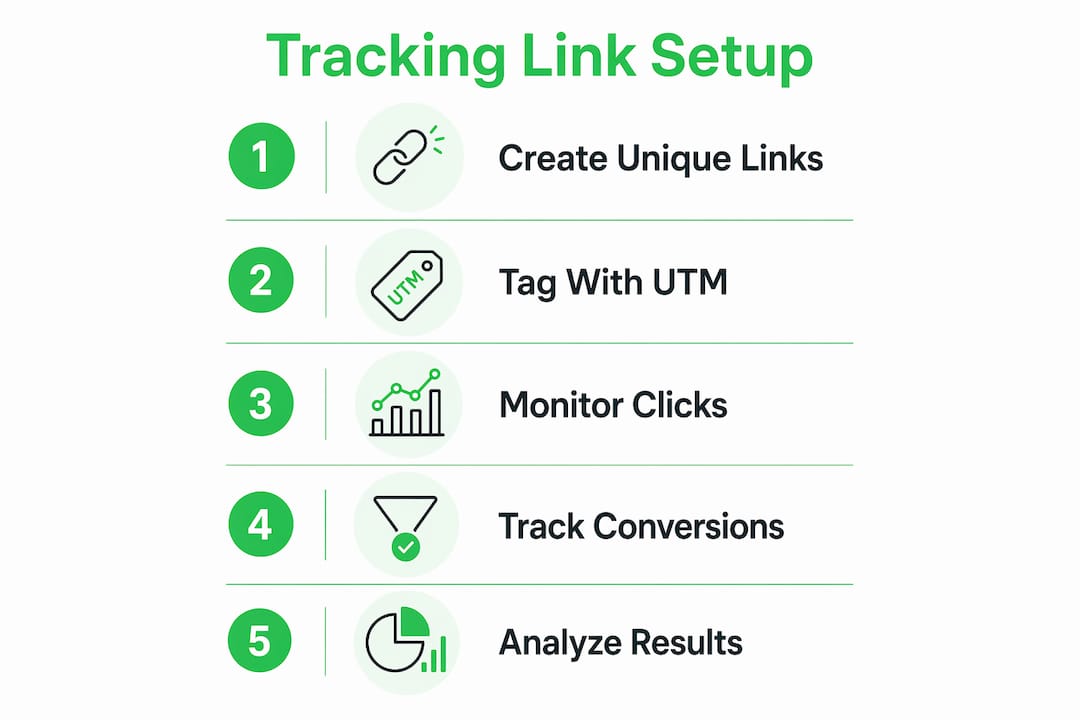
Link analytics capture pre-arrival click data while GA4 measures post-arrival behavior. Neither tool alone covers the full funnel. That is why professional marketers combine both.
The referrer stripping problem is specific to email and SMS traffic. Traffic from email channels often appears as "direct" in GA4 because email clients strip the referrer header before the click reaches your site. Server-side link tracking solves this by capturing the source at the click level, before the visitor ever lands on your page. This fills the visibility gap that standard GA4 setups miss entirely.
ClickMagick handles both pre-click tracking and basic post-click conversion tracking in one platform. Cuttly adds link analytics with geographic and device breakdowns. GA4 covers on-site behavior and goal completions. Using all three together gives you the complete picture from the moment someone clicks your solo ad link to the moment they purchase.
Pro Tip: When you set up GA4 goals for your squeeze page and thank-you page, tag every solo ad link with UTM parameters using the format: utm_source=vendorname, utm_medium=soload, utm_campaign=campaignname. This makes vendor comparison in GA4 reports clean and immediate.
How do you set up and optimize tracking links for solo ads?
Setting up tracking links correctly from the start saves hours of cleanup later. Follow these steps to build a tracking system that gives you reliable data from day one.
Step-by-step setup
- Choose your primary tracker. ClickMagick is the most widely used option among solo ad buyers because it handles click fraud detection, conversion tracking, and split testing in one place.
- Create a unique tracking link for each vendor order. Never reuse a link across different vendors or campaigns. One link per order keeps your data clean.
- Apply a consistent UTM naming convention. A simple naming standard like campaign_source_vendorname is the foundation of reliable vendor comparison. Inconsistent naming produces messy data that cannot be used for budget decisions.
- Set up conversion goals in GA4. Define your opt-in page and thank-you page as conversion events. This connects pre-click traffic data to post-click revenue outcomes.
- Test before you send. Click your own tracking link, complete the opt-in, and confirm the conversion fires in both your tracker and GA4. A broken tracking setup on a 500-click order is an expensive mistake.
- Place your tracking link in the solo ad order form. Give the vendor your tracking URL, not your direct squeeze page URL. This is how you capture every click they send.
What to measure and how to act on it
Once your campaign runs, focus on these data points:
- Opt-in rate. A healthy solo ad opt-in rate sits between 30–50% for a well-matched offer and list. Below 25% signals a mismatch between the vendor's audience and your lead magnet.
- Email open rate. Tracks how engaged the leads are after they join your list. Low open rates from a specific vendor's traffic suggest list quality issues.
- Cost per lead. Divide your total spend by the number of opt-ins. This is your primary budget reallocation metric. Soloadsguide covers cost per lead optimization in detail for marketers who want to reduce this number systematically.
- Sales conversion rate. The percentage of leads who buy. This is the metric that separates profitable vendors from expensive ones.
Review these numbers after every order. If a vendor delivers a 40% opt-in rate and a 3% sales conversion rate, they earn a repeat order. If another delivers a 15% opt-in rate and zero sales, you move on. The data makes the decision for you.
Key takeaways
Tracking links are the single most important tool for measuring and improving solo ad campaign performance, combining pre-click and post-click data to drive real ROI.
| Point | Details |
|---|---|
| Tracking reveals true performance | Opt-in rate, sales conversion, and cost per lead tell you more than raw click counts ever will. |
| Skipping tracking wastes budget | Untracked campaigns fund underperforming vendors invisibly, compounding losses over time. |
| Combine tools for full visibility | Pair ClickMagick or Cuttly with GA4 to cover both pre-click and post-click data gaps. |
| UTM naming conventions matter | A consistent naming standard like source_vendor_campaign makes vendor comparison reliable and fast. |
| Conversion tracking beats click tracking | Knowing who paid, not just who clicked, is the only metric that drives profitable decisions. |
Tracking is the habit that separates profitable marketers from frustrated ones
I have reviewed hundreds of solo ad campaigns over the years, and the pattern is always the same. Marketers who struggle with solo ads almost always have one thing in common: they track clicks but nothing else. They see a vendor deliver 500 clicks, assume the campaign underperformed because they did not get rich overnight, and move on. They never check opt-in rates by vendor. They never connect their email list growth to actual sales. They are making decisions in the dark.
The marketers who scale profitably treat tracking as a non-negotiable process, not an optional extra. They set up ClickMagick before they place their first order. They build UTM naming conventions into a simple spreadsheet so every campaign is comparable. They check their GA4 conversion reports within 48 hours of a campaign ending. That discipline is what turns solo ads from a gamble into a repeatable acquisition channel.
The uncomfortable truth is that most solo ad failures are not vendor failures. They are measurement failures. A vendor who looks terrible without tracking data often looks average or even good once you see the full picture. And a vendor who looks great based on click volume alone sometimes disappears when you check actual sales attribution.
If you want to scale your affiliate campaigns with solo ads, start with your tracking setup. Everything else, including vendor selection, offer testing, and budget decisions, depends on the data you collect. Check the solo ads guide for a full breakdown of how to build this system from scratch.
— Phil
Start tracking smarter with Soloadsguide
If you are ready to stop guessing and start making data-driven decisions with your solo ad campaigns, Soloadsguide is built for exactly that.
Soloadsguide gives affiliate marketers access to verified tier-1 solo ad vendors ranked by conversion quality, not just click volume. The platform includes tracking tool recommendations, vendor performance reviews, and step-by-step guidance for setting up your measurement system correctly. Users have reported a 40% reduction in cost per lead after applying the strategies covered in the guide. Browse the best solo ad providers ranked and reviewed for 2026, or visit Soloadsguide to access the full resource library and start optimizing your campaigns today.
FAQ
What are tracking links in solo ads?
Tracking links are tagged URLs placed in solo ad orders that record click data, traffic source, device type, and conversion events. They give affiliate marketers visibility into which vendors and campaigns produce real leads and sales.
How do i track solo ads without losing data?
Use a dedicated link tracker like ClickMagick combined with UTM parameters and GA4 conversion goals. Server-side tracking fills the referrer stripping gap common in email traffic, where clicks appear as "direct" in standard analytics tools.
Why do raw click counts mislead solo ad buyers?
A campaign with 500 clicks and a 10% conversion rate outperforms one with 5,000 clicks and a 0.2% rate. Raw click volume does not reflect revenue, which is why conversion tracking is the only reliable performance metric.
What is the best solo ad tracking tool in 2026?
ClickMagick is the most widely used tracker among solo ad buyers because it covers click fraud detection, conversion tracking, and split testing. Pairing it with GA4 gives you both pre-click and post-click data for full-funnel measurement.
How often should i review my solo ad tracking data?
Review your opt-in rate, cost per lead, and sales conversion rate within 48 hours of each campaign ending. This timeline lets you reallocate budget to top vendors before your next order cycle begins.
Recommended
- How to Track Solo Ad Traffic (Catch Low-Quality Clicks)
- Are Solo Ads Still Worth It in 2026? Honest Assessment
- Solo Ads Blog, Tips, Guides & Reviews | SoloAdsGuide.com
- The Ultimate Guide to Solo Ads (2026) | SoloAdsGuide.com
Want Verified Traffic Without the Guesswork?
PulseTraffic screens every seller, filters bot clicks in real time, and shows you verified buyer traffic labels before you spend a dollar.