

Yes, CAN-SPAM applies to you as an affiliate. If you send commercial email to U.S. recipients, whether through your own list or via a solo ad vendor, you are subject to the CAN-SPAM Act. Your first action: confirm that every opt-out request is honored within 10 business days and that your "From" line accurately identifies who is sending the message.
Here are the five elements every compliant affiliate email must include:
- Accurate headers: The "From," "To," and routing information must identify the actual sender.
- Non-deceptive subject line: The subject must reflect the actual content of the email.
- Ad identification: Commercial messages must be clearly identified as advertisements when required.
- Physical postal address: A valid street address, P.O. box, or private mailbox registered with a commercial agency.
- Working unsubscribe mechanism: A clear opt-out link that processes requests within 10 business days.
Both the affiliate and the merchant can be held liable for a non-compliant email. Designating one party as the "sender" in a contract does not automatically shield the other. The FTC and FCC both enforce these rules, and penalties run per individual email sent.
Key Takeaways
CAN-SPAM applies to every affiliate who sends or procures commercial email to U.S. recipients, and both affiliates and merchants can be held liable regardless of what a contract says.
| Point | Details |
|---|---|
| CAN-SPAM applies to affiliates | Any affiliate who sends or procures a commercial email to U.S. recipients must comply, full stop. |
| Honor opt-outs within 10 business days | Process every removal request promptly; inbox providers often require faster action than the statute mandates. |
| Accurate headers and ad disclosure | The "From" line, subject, and ad identification must be truthful and present in every commercial email. |
| Verify vendors before buying traffic | Demand suppression-scrub confirmation, opt-out logs, and sending domain details before any campaign launches. |
| Soloadsguide vetting framework | The 21-Question Vendor Vetting Framework at Soloadsguide helps affiliates verify vendor compliance practices before spending. |
Table of Contents
- What does the CAN-SPAM Act actually cover?
- Who must comply: how CAN-SPAM applies to affiliates and networks
- What every affiliate promotional email must include
- How to implement unsubscribe flows and manage suppression lists
- Common violations and enforcement risks for affiliates
- Pre-send compliance checklist for every affiliate campaign
- Sample compliant email templates and disclosure language
- What to do if you receive a CAN-SPAM complaint or enforcement notice
- What solo ads experience actually teaches about compliance
- How Soloadsguide helps you buy traffic and stay compliant
- Sources
What does the CAN-SPAM Act actually cover?
The CAN-SPAM Act, codified at 15 U.S.C. chapter 103, regulates commercial email messages sent to U.S. recipients. A "commercial" message is one whose primary purpose is to advertise or promote a commercial product or service. Purely transactional messages, such as order confirmations or account notifications, are generally exempt from the advertising-disclosure and opt-out requirements, though their headers must still be accurate.
The Act was signed into law as Public Law 108-187 and is administered primarily by the Federal Trade Commission, with the FCC playing a supporting role for wireless and related communications. The FTC issues implementing regulations under 16 C.F.R. part 316, which define technical terms like "sender," "initiate," and "procure" with the precision you need for compliance programs.
The CAN-SPAM Act does not require recipients to opt in before you email them. It sets a floor of required disclosures and an opt-out right. That floor is lower than GDPR or CASL, but it is still legally binding and actively enforced.
Civil penalties under CAN-SPAM can be substantial per violation, and each individual non-compliant email counts as a separate violation. That math gets uncomfortable fast on a list of any size.
Who must comply: how CAN-SPAM applies to affiliates and networks
Sender vs. initiator: the definitions that matter
The FTC's guidance draws a clear line between a "sender" and an "initiator." An initiator is any party that transmits or procures the transmission of a commercial email. A sender is the initiator whose product or service is advertised in the message. When multiple parties are involved, such as an affiliate, a network, and a merchant, all of them can qualify as initiators, and all can share liability.
The FTC allows multi-party arrangements to designate a single "sender" in writing, but that designation only works if the designated sender's domain appears in the "From" line and that party actually complies with every requirement. If the designated sender drops the ball on opt-outs, the other parties do not automatically walk free.
Who is on the hook in common affiliate scenarios
| Scenario | Who is the sender | Who can be liable |
|---|---|---|
| Affiliate sends email from own domain promoting merchant offer | Affiliate | Affiliate (primary); merchant if it procured the send |
| Merchant designates affiliate as sender in writing | Affiliate | Affiliate (primary); merchant retains exposure if affiliate fails |
| Solo ad vendor sends email on affiliate's behalf | Vendor or affiliate, depending on "From" line | Both vendor and affiliate as co-initiators |
| Affiliate network sends broadcast to its own list | Network | Network (primary); affiliate if it directed the send |
The practical takeaway: buying a solo ad does not transfer your compliance obligation to the vendor. You are still an initiator because you procured the transmission. Verify the vendor's practices before you spend a dollar.
What to verify in vendor contracts and message headers
- Confirm the "From" line domain matches the designated sender's actual domain.
- Require written confirmation that the vendor maintains and honors a suppression list.
- Ask for sample headers from recent sends to check SPF, DKIM, and DMARC alignment.
- Demand access to opt-out logs or at minimum a weekly suppression-sync file.
- Get a clause requiring the vendor to notify you within 24 hours of any complaint or opt-out spike.
Vendor questions to ask before buying solo ad traffic:
- Do you maintain a suppression list, and will you scrub my list against it before sending?
- Can you provide opt-out processing logs after the campaign?
- What is your unsubscribe mechanism, and how quickly do you process requests?
- Will you share the sending domain and "From" address before the campaign launches?
- Do you have audit logs showing suppression syncs from prior campaigns?
What every affiliate promotional email must include
Accurate header information
Every field in the email header that identifies the sender must be truthful. The "From" name and address, the "Reply-To" address, and the originating IP or domain must all accurately represent the party sending the message. Spoofed or misleading headers are among the most common triggers for FTC enforcement.
On the technical side, your sending domain should have SPF, DKIM, and DMARC records configured. These authentication standards do not appear in the CAN-SPAM statute itself, but inbox providers treat their absence as a strong spam signal, and a message that never reaches the inbox cannot generate the opt-out it is legally required to offer.
Non-deceptive subject lines
The subject line cannot mislead the recipient about the content or nature of the message.
- Deceptive: "Your account has been updated" (when the email is a promotional offer)
- Deceptive: "Re: our conversation" (when there was no prior conversation)
- Compliant: "New offer inside: [Product Name] for email marketers"
- Compliant: "Special deal from [Brand] — limited time"
The test is simple: would a reasonable person feel deceived after opening the email and seeing its actual content? If yes, the subject line fails.
Ad identification and FTC disclosure
When a message is primarily commercial, it must be clearly identified as an advertisement. There is no required magic phrase, but language like "Advertisement," "Promotional Email," or "Sponsored" placed prominently near the top of the message satisfies the requirement. If the email includes affiliate links, the FTC Endorsement Guides also require a clear disclosure of the material connection between you and the merchant.
A compliant disclosure for an affiliate email looks like this: "This email contains affiliate links. If you purchase through these links, we may earn a commission at no additional cost to you."
Physical postal address
Every commercial email must include a valid physical address for the sender. Acceptable options include:
- A current street address
- A P.O. box registered with the U.S. Postal Service
- A private mailbox registered with a commercial mail-receiving agency under Postal Service regulations
Place the address in the footer of every email. It does not need to be prominent, but it must be present and accurate.
Opt-out mechanism and the 10-business-day rule
Once a recipient requests removal, you have 10 business days to stop sending them commercial email. You cannot charge a fee, require the recipient to provide information beyond an email address, or make them take more than one step to unsubscribe.
The unsubscribe link must remain functional for at least 30 days after the email is sent. After a recipient opts out, you cannot sell or transfer their address to another list, with narrow exceptions for suppression-list sharing with a service provider.
Sample compliant email footer (inspired by local business email marketing examples):
From: Your Name <you@yourdomain.com>
Subject: [Advertisement] Great deal on [Product]

[Email body]

This is an advertisement. You received this email because you subscribed at [source].
This email contains affiliate links.

To unsubscribe, click here: [Unsubscribe Link]

Your Name | 123 Main Street, Suite 100, Anytown, TX 75001
Pro Tip: Major inbox providers like Gmail and Yahoo now require one-click unsubscribe headers (RFC 8058) for bulk senders. Their enforcement timelines are often shorter than CAN-SPAM's 10-business-day window. Build your suppression workflow to process opt-outs within 24 hours to stay safe on both fronts.
How to implement unsubscribe flows and manage suppression lists
Step-by-step technical implementation
- Add a unique unsubscribe link to every commercial email. The link should pass the recipient's email address (hashed or encoded) to your opt-out endpoint.
- Build or configure a one-click opt-out endpoint that immediately adds the address to your suppression list without requiring login or additional steps.
- Write the suppressed address to a master suppression file in real time. Use a standardized format (plain-text CSV or SHA-256 hashed list) so it can be shared with vendors.
- Suppress before every send. Run your active list against the suppression file before uploading to any email service provider or solo ad vendor.
- Audit the suppression file monthly. Check for duplicates, formatting errors, and addresses that should have been added but were not.
- Log every opt-out with a timestamp, the campaign ID, and the method of opt-out (link click, reply, manual request).
Sharing suppression lists with vendors and networks
When you buy solo ad traffic, your suppression list needs to travel with the order. Send the vendor a hashed version of your suppression file before the campaign launches and require written confirmation that they scrubbed against it. After the campaign, request their opt-out log and merge any new removals into your master file within 24 hours.

For networks managing multiple affiliates, suppression sharing should be contractual. A clause worth including: "Vendor agrees to scrub all campaign sends against the suppression file provided by Affiliate no less than 24 hours before transmission and to provide a post-send opt-out log within 48 hours of campaign completion."
Pro Tip: Send a test opt-out to yourself before every large campaign. Click the unsubscribe link, wait 15 minutes, then check whether your address appears in the suppression file. This single step catches broken endpoints before they become compliance problems.
Common violations and enforcement risks for affiliates
Where affiliates most often go wrong
Affiliate email compliance failures tend to cluster around a handful of recurring mistakes:
- Buying or renting cold lists without verifying how the addresses were collected or whether a suppression scrub was performed.
- Failing to process opt-outs from prior campaigns before launching new ones, especially when switching vendors.
- Misleading subject lines that imply a personal relationship, a prior transaction, or urgency that does not exist.
- Missing or inaccurate physical addresses in the email footer, often because a template was copied without updating the address field.
- No ad disclosure on emails that are clearly promotional but are framed as personal recommendations.
- Shared liability blind spots: assuming the solo ad vendor's compliance covers your exposure as the initiator.
How enforcement works
The FTC is the primary enforcement agency for CAN-SPAM. State attorneys general can also bring civil actions, and in limited cases, internet service providers have standing to sue. The FTC can seek civil penalties of up to $51,744 per violation, and it has pursued both merchants and affiliates in enforcement actions where the affiliate was the party that procured or sent the non-compliant message.
The FTC's published guidance makes clear that shared liability is real: a merchant cannot insulate itself by pointing to an affiliate contract, and an affiliate cannot point to the vendor. Both parties can be named in an enforcement action.
Third-party compliance resources confirm that contractual disclaimers between affiliates and merchants do not eliminate legal exposure. The statute looks at who initiated and who benefited from the send, not at what the contract says.
Practical mitigation steps
- Keep campaign logs for a minimum of three years: sending headers, list sources, suppression-sync records, and vendor receipts.
- Document every opt-out with a timestamp and campaign reference.
- If you discover a compliance failure, stop the affected campaign immediately, add all recipients to your suppression list, and document the remediation steps taken.
- Review your vendor contracts annually to confirm suppression and opt-out clauses are current.
Pre-send compliance checklist for every affiliate campaign
Before you send
- List source documented: confirm how every address was collected and that the collection method complies with applicable law.
- Suppression scrub completed: active list has been run against your master suppression file.
- Vendor suppression confirmed in writing: vendor has acknowledged receipt of your suppression file and confirmed the scrub.
- "From" line verified: the sending domain matches the designated sender and has valid SPF, DKIM, and DMARC records.
- Subject line reviewed: no deceptive phrasing, no false urgency, no implied prior relationship.
- Ad disclosure present: "Advertisement" or equivalent language appears prominently in the email.
- Affiliate link disclosure present: material connection to the merchant is clearly stated.
- Physical address in footer: current, accurate, and in an acceptable format.
- Unsubscribe link tested: link resolves, processes the opt-out, and writes to the suppression file.
- One-click unsubscribe header configured: RFC 8058 List-Unsubscribe-Post header present for bulk sends.
Vendor due diligence before buying traffic
| Check | What to demand |
|---|---|
| Suppression scrub | Written confirmation and timestamp of scrub against your file |
| Opt-out processing | Post-campaign log showing all opt-outs received and processed |
| Sending domain | Exact "From" domain and authentication records before launch |
| List source | Vendor's explanation of how their list was built and last cleaned |
| Complaint rate | Recent complaint rate data from their ESP dashboard |
Recordkeeping minimums
- Campaign logs: sending headers, list counts, suppression-sync confirmation, and vendor receipts. Retain for at least three years.
- Opt-out logs: timestamped records of every removal request and the action taken.
- Suppression files: versioned copies of your suppression list before and after each campaign.
- Vendor communications: emails, contracts, and any written confirmations related to compliance steps.
Understanding types of email subscriber lists helps you evaluate whether a vendor's list is likely to generate complaints before you commit to a campaign.
Sample compliant email templates and disclosure language
Promotional email template
From: Jane Smith <jane@yourdomain.com>
Reply-To: jane@yourdomain.com

Hi [First Name],

I wanted to share a deal I think you'll find useful.

for email marketers. I've been following their work and think it's worth
a look if you're trying to [solve specific problem].

>> [Check out the deal here] (affiliate link)

Disclosure: This email contains affiliate links. If you purchase through
these links, I may earn a commission at no additional cost to you.

---
This is an advertisement. You are receiving this email because you
subscribed at [source/date].

To unsubscribe from future emails, click here: [Unsubscribe Link]

Jane Smith | 456 Commerce Ave, Suite 200, Austin, TX 78701
Transactional email: when the exemption applies and when it does not
A transactional message, such as a purchase receipt or a password reset, is exempt from the ad-disclosure and opt-out requirements. The exemption applies only when the primary purpose of the message is transactional. If you add a promotional offer to a receipt email, the FTC looks at whether the promotional content is incidental or whether it dominates the message. A receipt with a small "you might also like" section at the bottom is likely still transactional. A receipt where the promotional offer takes up half the email is probably commercial.
Subject line examples
Compliant:
- "[Advertisement] New webinar: email list building for affiliates"
- "Your free checklist is ready — download now"
- "Special offer from [Brand]: 20% off this weekend"
Deceptive (avoid):
- "Re: your recent order" (when there was no order)
- "Important account notice" (when the email is a promotion)
- "You've been selected" (implying a personal selection that did not occur)
FTC Endorsement Guide disclosure examples
When your email promotes a product through an affiliate link, the FTC Endorsement Guides require you to disclose the material connection clearly and conspicuously. The disclosure must appear near the affiliate link, not buried in a footer the reader is unlikely to see.
Compliant disclosure examples:
- "Affiliate link: I earn a commission if you buy through this link."
- "Sponsored: [Brand] paid for this placement."
- "Disclosure: I have an affiliate relationship with [Brand] and may earn a fee on purchases."
What to do if you receive a CAN-SPAM complaint or enforcement notice
Immediate steps
- Stop the offending campaign immediately. Pause all sends associated with the complaint before doing anything else.
- Preserve all logs. Do not delete, overwrite, or modify any sending headers, campaign records, suppression files, or vendor communications related to the campaign.
- Document the suppression action. Add every address associated with the complaint to your suppression list and log the timestamp and reason.
- Notify your solo ad vendor or network. Inform them in writing that a complaint has been received and request that they halt any related sends.
- Pull a full campaign record. Gather the list source documentation, suppression-sync confirmation, sending headers, and any vendor receipts into a single folder.
Records to preserve immediately
- Full sending headers for the flagged campaign (Message-ID, DKIM signature, SPF result)
- Campaign ID and send timestamp
- Suppression-sync records showing the scrub was performed before the send
- Vendor receipts and written communications
- Opt-out log entries related to the complaint
- Screenshots of the email as sent, including footer and unsubscribe link
When to involve legal counsel
Contact an attorney before responding to any formal FTC inquiry or civil complaint. If your ESP notifies you of a complaint threshold breach, treat it with the same urgency. Prepare a written remediation timeline that documents what went wrong, what you have already corrected, and what controls you are putting in place to prevent recurrence. Regulators and partners both respond better to a documented remediation plan than to silence.
What solo ads experience actually teaches about compliance
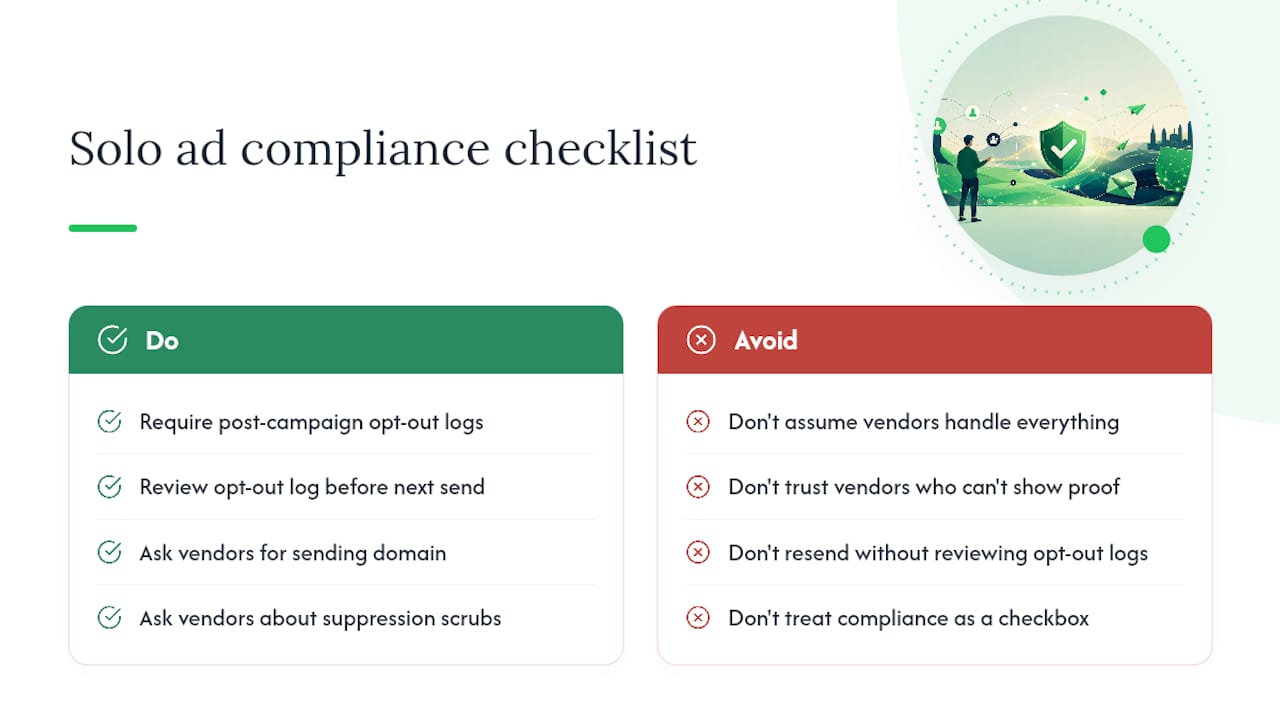
Most affiliates who get into trouble with email compliance do not ignore the rules on purpose. They buy a solo ad from a vendor who promises a clean, responsive list, assume the vendor handles everything, and never ask a single question about suppression scrubs or opt-out processing. That assumption is where the exposure lives.
The vendors who cause the most problems are often the ones who are most confident about their list quality. A vendor who cannot produce an opt-out log from a recent campaign, or who cannot tell you the sending domain before the campaign launches, is a vendor whose practices you cannot verify. Unverifiable claims are the core problem in this industry, and compliance is no different from traffic quality in that respect: if you cannot see the proof, you cannot trust the claim.
Deliverability and compliance are also more connected than most affiliates realize. A list that generates high complaint rates will eventually get your sending domain blacklisted, which kills deliverability long before the FTC gets involved. Maintaining a clean suppression list and honoring opt-outs promptly is not just a legal obligation; it is what keeps your emails reaching inboxes. The affiliates who treat compliance as an operational discipline rather than a legal checkbox tend to have better long-term results, because their lists stay clean and their vendors stay accountable.
One pattern worth noting: affiliates who require vendors to provide a post-campaign opt-out log, and who actually review that log before the next send, catch suppression failures early. A vendor who processed zero opt-outs from a 5,000-click campaign has either a suspiciously perfect list or a broken unsubscribe flow. Either way, you want to know before you send again.
How Soloadsguide helps you buy traffic and stay compliant
Compliance is only half the equation. The other half is finding solo ad vendors whose lists are actually clean enough to be worth sending to. That is where most affiliates lose money before they ever think about CAN-SPAM.

Soloadsguide was built around a single premise: most traffic vendors overpromise, and you need a structured way to verify their claims before you spend. The 21-Question Vendor Vetting Framework gives you a concrete set of questions to ask any solo ad vendor before committing to a campaign, covering suppression practices, opt-out processing, sending domain authentication, and complaint rate history. The same framework that protects your deliverability also protects your compliance posture. You can also use the guides on avoiding spam traps when buying solo ads and affiliate traffic channels to build a vetting process that holds up under scrutiny. Start with the vendor vetting framework at Soloadsguide before your next campaign.
Sources
These primary sources are the ones to bookmark for your compliance program. Each covers a distinct layer of the legal framework.
- CAN-SPAM Act: A Compliance Guide for Business
- CAN-SPAM | Federal Communications Commission
- eCFR — Title 16, Chapter I, Subchapter C, Part 316
- 15 U.S.C. chapter 103 — CAN-SPAM Act statutory text
- Govinfo
This article is general information, not a substitute for advice from a qualified lawyer. Consult a qualified legal professional about your own circumstances before acting on anything here.
Recommended
- How to Avoid Spam Traps When Buying Solo Ads
- The Solo Ads Guide for Affiliate Marketers
- Why Small Businesses Need Email Traffic: A Vetting-First Guide
- Types of Email Subscriber Lists: A Marketer's Guide
Want Verified Traffic Without the Guesswork?
PulseTraffic screens every seller, filters bot clicks in real time, and shows you verified buyer traffic labels before you spend a dollar.
