

The five most practical jvnotifypro.com alternatives are MunchEye, WarriorPlus, JVZoo, ClickBank, and OfferVault. Before you spend a dollar on solo-ad traffic from any of them, run a small tracked micro-test with a click-tracking link and at least one seed email to confirm deliverability. Aggregator lists like Sitelike surface dozens of similar sites, but most are community-voted directories with no quality filter. A short, verified shortlist beats a long, unvetted one every time.
Here is how these alternatives differ from JVNotifyPro at a glance:
- Public vs. gated access: MunchEye, WarriorPlus, JVZoo, ClickBank, and OfferVault all offer public launch calendars or open offer searches. JVNotifyPro requires account registration to see full product pages.
- Automation and prelaunch filtering: Affiliate marketplaces like JVZoo include native prelaunch filters inside their dashboards, surfacing verified listings in real time. JVNotifyPro depends on manual vendor submissions, which means listings can lag behind actual launch dates.
- Data transparency: Marketplaces give you funnel metrics, affiliate dashboards, and payout history. Launch calendars give you dates and product names. Use calendars for discovery, then verify inside the network.
Table of Contents
- How to vet jvnotifypro.com alternatives before you buy
- What Soloadsguide gives you that no calendar can
- Key Takeaways
How to vet jvnotifypro.com alternatives before you buy
Philip Coble, a solo ads vendor with 11 years in the industry and the author behind Soloadsguide, built the 21-Question Vendor Vetting Framework specifically for buyers who want to verify claims before committing budget. Here is the full framework, organized by phase.

The 21-Question Vendor Vetting Framework
Discovery (questions 1–5)
- Where did you find this vendor or product listing — launch calendar, marketplace, or forum?
- Is the listing on a public calendar or a gated platform?
- Does the same listing appear on multiple sites that may share a database?
- How long has this vendor been active on the platform?
- Does the vendor have a verifiable presence outside the listing (website, social profile, email)?
Pre-purchase checks (questions 6–10)
- Can you confirm the product or offer inside the affiliate network's own dashboard?
- Does the affiliate network show a prelaunch filter entry for this product (JVZoo, ClickBank)?
- What is the stated opt-in rate, and can the vendor provide a screenshot with a visible timestamp?
- Does the vendor allow a tracked test link before a bulk purchase?
- Are there third-party reviews from buyers, not just the vendor's own testimonials?
Proof of traffic (questions 11–14)
- Can the vendor share a Google Analytics UTM report showing traffic source and behavior?
- Do click timestamps cluster unnaturally (bot traffic often fires in tight bursts)?
- Has the vendor sent traffic to a squeeze page in your niche, and can they show opt-in data?
- Will the vendor place a tracking pixel on the confirmation page?
Delivery and integration (questions 15–18)
- What email service provider does the vendor use, and does it integrate with yours?
- Can you set up a redirect link through your own tracker (ClickMagick, Voluum, or similar)?
- What is the stated delivery window, and is it in writing?
- Does the vendor support seed-email placement for deliverability checks?
Post-purchase metrics (questions 19–21)
- What open rate and click-through rate should you expect, and what is the basis for that claim?
- How will the vendor handle under-delivery or disputed click counts?
- Will the vendor provide a post-campaign report with raw click data?
Comparing the top alternatives
Modern affiliate marketers have shifted toward automated marketplaces because manual, submission-based calendars lag behind real network data. The table below summarizes key features of each alternative for vetting.
| Platform | Public access | Data transparency | Update frequency | Best use | Vendor contact / approval | Pricing model |
|---|---|---|---|---|---|---|
| MunchEye | Public calendar | Dates and product names only | Manual submissions | Discovery | Via listed JV page | Free |
| WarriorPlus | Public marketplace | Sales stats, EPC, refund rate | Automated | Discovery + vetting | Instant affiliate approval | Free; seller fees apply |
| JVZoo | Public marketplace | Prelaunch filters, dashboards | Automated | Vetting + discovery | Vendor-controlled approval | Free; seller fees apply |
| ClickBank | Public marketplace | Gravity score, analytics | Automated | Vetting + discovery | Open affiliate sign-up | Free; seller fees apply |
| OfferVault | Public aggregator | Payout and network data | Aggregated | Discovery across networks | Via listed network | Free |
Because many launch-calendar sites share listing databases, checking five calendars often returns the same data. Pick one reliable calendar for discovery, then move directly to the network dashboard for verification.
Red flags to watch for
- Vendor refuses to allow a tracked test link before bulk purchase
- Sales screenshots with no visible timestamp or traffic source
- Guaranteed ROI or opt-in rate claims with no supporting data
- Click timestamps that cluster in tight, unnatural bursts
- Forced upsells or prepayment required before any traffic is sent
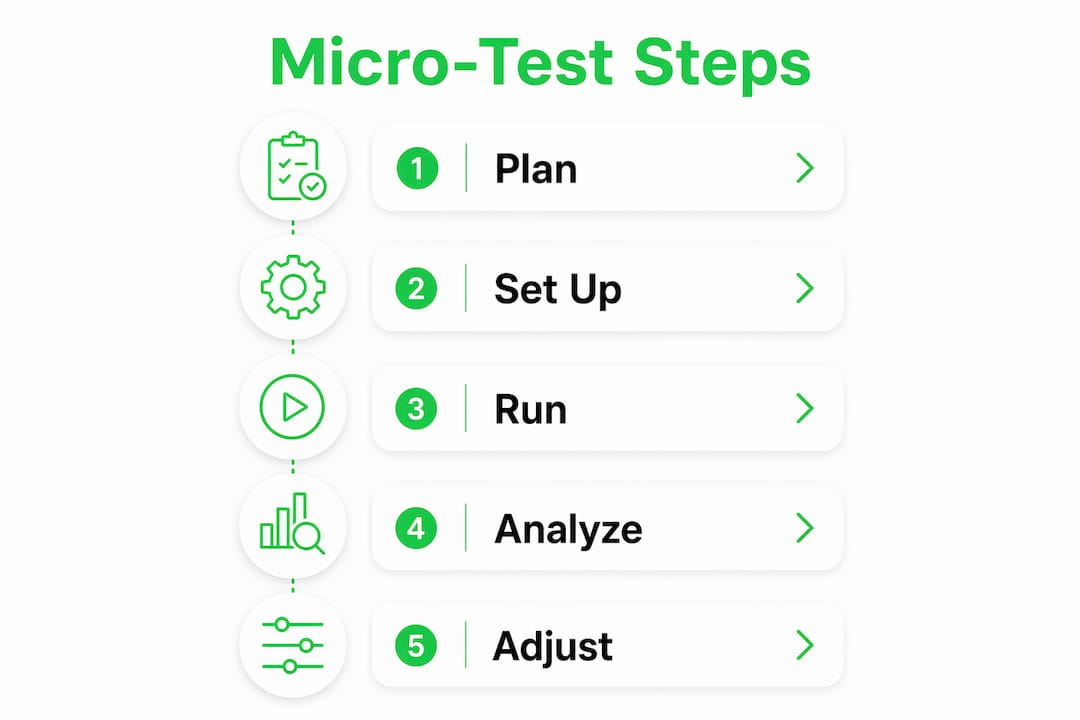
How to run a micro-test
- Set budget and timeline. A U.S.-relevant micro-test typically runs a modest budget for a small number of clicks, delivered over a few days.
- Build a tracking link. Use ClickMagick, Voluum, or a similar tracker. Append UTM parameters:
utm_source,utm_medium,utm_campaign, andutm_content. Learn the full setup in this click tracking guide. - Place a seed email. Add one address you control to the vendor's send list. Confirm it arrives in the inbox, not spam, and check the sending domain's reputation.
- Check deliverability. Use MXToolbox or Google Postmaster Tools to verify the sender's domain health before scaling.
- Benchmark results. A healthy micro-test shows a relatively strong opt-in rate on a well-matched squeeze page and a reasonable click-to-open ratio. Anything below that warrants a follow-up question before you scale.
- Scale only after confirmation. If timestamps look clean, opt-in rates hit benchmark, and your seed email landed in the inbox, you have enough signal to negotiate a larger buy.
Pro Tip: Run two staggered micro-tests with overlapping UTM cohorts and separate seed-email addresses. If both tests show the same click timestamps and IP ranges, you have strong evidence the list is real. If the second test shows a completely different click pattern, the vendor may be rotating traffic sources, which is worth investigating before scaling.
For integration, capture at minimum utm_source and utm_medium in your email service provider's custom fields. Most major ESPs (ActiveCampaign, GetResponse, AWeber) support UTM pass-through on opt-in forms. Preserve attribution on redirects by using a 301 redirect with the tracking parameters appended, not stripped.
What Soloadsguide gives you that no calendar can
Every platform above helps you find offers. None of them tells you whether the traffic behind those offers is real. That gap is exactly what Soloadsguide was built to close.

Soloadsguide publishes the full 21-question vetting checklist, ready-to-use tracking link templates, seed-email setup instructions, a sample micro-test budget and timeline, and a reporting spreadsheet you can use from day one. Written by Philip Coble from 11 years of hands-on experience as a solo ads vendor, the guides assume vendors overpromise and teach you to verify every claim with data. If you want to vet solo ad sellers before spending, start with the free buyer's checklist at Soloadsguide.
Key Takeaways
The most reliable approach to finding jvnotifypro.com replacement options is to use one launch calendar for discovery, verify inside the affiliate network dashboard, and confirm traffic quality with a tracked micro-test before buying at scale.
| Point | Details |
|---|---|
| Use calendars for discovery only | MunchEye and similar sites surface product names; always verify inside JVZoo, ClickBank, or WarriorPlus dashboards. |
| Micro-test before bulk buys | A modest budget micro-test with a tracking link and seed email confirms traffic quality before you scale. |
| Watch for shared databases | Many launch-calendar sites pull from the same data pool, so checking multiple calendars rarely adds new information. |
| Apply the 21-question framework | Soloadsguide's vetting framework covers discovery through post-purchase metrics to catch red flags before you spend. |
| Soloadsguide as your next step | Download the free buyer's checklist and tracking templates at Soloadsguide to implement the full vetting process. |
Recommended
Want Verified Traffic Without the Guesswork?
PulseTraffic screens every seller, filters bot clicks in real time, and shows you verified buyer traffic labels before you spend a dollar.
