

Solo ad click tracking is the process of using unique tracking links and analytics tools to count, filter, and analyze every click generated from a solo ad campaign in real time. Without it, you have no way to verify whether a vendor delivered what you paid for, or whether your funnel is converting that traffic into subscribers and revenue. Tools like ClickMagick, Qliker, and Improvely give affiliate marketers the data layer that separates profitable campaigns from expensive guesswork. Solo ad click tracking explained correctly means understanding not just how many clicks arrived, but which ones were real, engaged, and worth paying for.
What is solo ad click tracking and why does it matter?
Solo ad click tracking is the standard industry term for monitoring traffic delivered through solo ad campaigns using unique URLs that record each visitor's data. Every time a vendor sends your email to their list, clicks flow through your tracking link before landing on your squeeze page. That link captures timestamps, IP addresses, geographic data, and device type, giving you a complete picture of who clicked and when.
Solo ads are unaffected by iOS 14+ tracking changes or ad account bans, making them a stable traffic source compared to Facebook or Google Ads. That stability is valuable, but it does not eliminate the need for your own tracking layer. Vendors report their own click counts, and those numbers do not always match what a third-party tool records.

Reputable solo ad traffic averages $0.50 to $0.95 per click in 2026, with premium Tier-1 traffic reaching $1.00. Prices below $0.40 almost always signal bot traffic or low-quality lists. Knowing this benchmark helps you spot suspicious vendors before you spend.
What types of solo ad clicks are tracked?
Understanding solo ad click types explained correctly is the foundation of accurate reporting. Not every click that hits your tracking link represents a real human with genuine interest.
The four main click types you will encounter are:
- Unique clicks: The first click from a single IP address or device. This is the number vendors quote and the one that matters most for measuring reach.
- Duplicate clicks: Repeat visits from the same IP. A high duplicate rate can indicate a small, recycled list or a vendor inflating their numbers.
- Bot clicks: Automated traffic generated by scripts or click farms. Top-tier vendors use machine learning to filter these out before delivery, but not all vendors do.
- Incentivized clicks: Clicks from people who were paid or rewarded to click, not because they were genuinely interested in your offer. These rarely convert into opt-ins or sales.
The practical impact is significant. If a vendor delivers 500 clicks but 200 are duplicates and 80 are bots, you effectively received 220 real unique visitors. Your opt-in rate and cost per subscriber calculations will be completely wrong if you use the vendor's raw number.
Pro Tip: Set your tracking tool to display unique clicks only when comparing vendor performance. Raw click counts include duplicates and will inflate your apparent traffic volume.
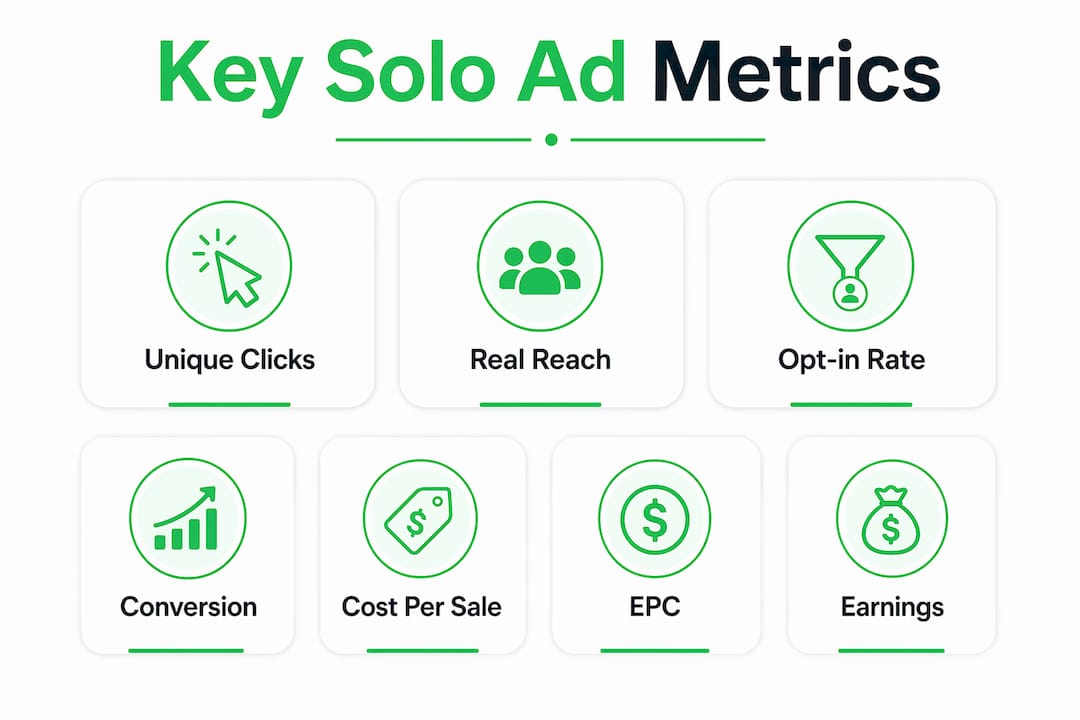
Which solo ad performance metrics must you track?
Tracking clicks is only the starting point. The metrics below tell you whether those clicks are actually building a profitable business.
- Clicks delivered vs. clicks ordered. Verify that the vendor sent the volume you paid for. A shortfall of more than 5% is worth flagging immediately.
- Opt-in rate. Divide opt-ins by unique clicks and multiply by 100. A healthy opt-in rate sits between 30% and 50% for a well-optimized squeeze page. Opt-in rates vary widely from 15% to 55% depending on your headline and offer strength, even with identical traffic.
- Cost per subscriber (CPS). Divide total spend by the number of opt-ins. This tells you what each new email subscriber actually costs you.
- Earnings per click (EPC). Divide total revenue by total clicks. The EPC formula is total revenue divided by clicks. It benchmarks traffic quality across different vendors objectively.
- 30-day ROI. Calculate this as revenue minus spend, divided by spend, multiplied by 100. Solo ad subscribers often take up to 30 days to convert, with 60–70% of revenue arriving post-click within that window. Judging a campaign at day three is almost always premature.
- Back-end revenue. Front-end sales from your initial offer represent only a fraction of total campaign value. Track upsells, email follow-up conversions, and recurring commissions separately.
The table below shows how these metrics connect in a real campaign scenario.
| Metric | Formula | What it tells you |
|---|---|---|
| Opt-in rate | Opt-ins ÷ unique clicks × 100 | Funnel and offer quality |
| Cost per subscriber | Total spend ÷ opt-ins | Efficiency of traffic spend |
| Earnings per click | Total revenue ÷ total clicks | Overall traffic profitability |
| 30-day ROI | (Revenue − spend) ÷ spend × 100 | True campaign return over time |
| Back-end revenue | Upsells + follow-up conversions | Long-term list value |
Successful tracking requires disciplined spreadsheet record-keeping with fields for vendor, spend, opt-ins, total revenue, and ROI so you can compare campaigns over time. A simple Google Sheet with these columns is enough to spot patterns across dozens of vendors.
How to track solo ad clicks using the right tools
The three tools most affiliate marketers rely on for solo ad tracking are ClickMagick, Qliker, and Improvely. Each creates unique tracking links, filters suspicious traffic, and provides real-time dashboards.
Here is how to set up tracking correctly from the start:
- Create a unique tracking link for every vendor. Never reuse a link across multiple campaigns. Separate links let you isolate which vendor drove which results.
- Add sub-IDs or UTM parameters. Append identifiers like
?sub=vendornameto your tracking URL. This lets you segment data inside your analytics platform or email autoresponder. - Set your tracking tool to filter bots. ClickMagick, for example, has a built-in bot filter that flags clicks from known data centers and suspicious IP ranges. Enable it before your campaign goes live.
- Connect your tracking link to your funnel. The link should redirect to your squeeze page. Your autoresponder, such as GetResponse or AWeber, then records opt-ins. Cross-reference both data sources after the campaign ends.
- Monitor clicks in real time. If 300 clicks arrive in the first two hours of a 500-click order, that velocity is unusual. Legitimate email sends typically spread clicks over 24–48 hours.
Using third-party tracking tools like ClickMagick or Qliker allows real-time monitoring, fraud detection, and granular vendor performance insights that vendor-reported numbers simply cannot provide.
One common pitfall: some vendors refuse to allow third-party tracking links. This is a red flag. Any reputable vendor welcomes independent verification. If a vendor insists you use only their internal stats, treat that as a reason to look elsewhere.
Pro Tip: Run your tracking link through a link checker before sending it to your vendor. A broken redirect means you lose all data for the entire campaign with no way to recover it.
How to analyze tracking data and optimize your campaigns
Data without action is just noise. The goal of tracking is to make better decisions faster.
- Start with a small test order. Testing 100–200 clicks before scaling helps you identify traffic quality and funnel performance without risking your full budget. If your opt-in rate falls below 25%, fix your landing page before ordering more clicks.
- Separate funnel problems from traffic problems. If two different vendors produce the same low opt-in rate, the issue is your squeeze page, not the traffic. If one vendor produces 40% opt-ins and another produces 12% with the same page, the traffic quality differs.
- Check email engagement after opt-in. Measuring opt-in and email engagement rates immediately after clicks helps distinguish genuinely interested subscribers from low-quality clicks. Open rates below 10% on your first follow-up email suggest the traffic was not well-targeted.
- Wait the full 30-day window before judging ROI. Many beginners fail to track 30-day revenue, killing otherwise profitable campaigns prematurely. A campaign that looks like a loss at day seven can turn profitable by day 25 through back-end upsells and email follow-up sequences.
- Compare vendors using EPC, not just opt-in rate. A vendor with a 45% opt-in rate but $0.20 EPC is less valuable than one with a 35% opt-in rate and $0.55 EPC. Revenue is the final measure.
Pro Tip: Build a simple vendor scorecard in Google Sheets. Track opt-in rate, CPS, EPC, and 30-day ROI for every order. After ten campaigns, patterns become obvious and vendor selection gets much easier.
Key takeaways
Accurate solo ad click tracking is the single most important habit that separates profitable affiliate marketers from those who burn through budgets without understanding why.
| Point | Details |
|---|---|
| Track unique clicks only | Unique clicks are the only reliable measure of real reach; duplicates and bots inflate raw counts. |
| Monitor all six core metrics | Opt-in rate, CPS, EPC, 30-day ROI, and back-end revenue together reveal true campaign profitability. |
| Use third-party tools | ClickMagick, Qliker, or Improvely provide independent verification that vendor-reported stats cannot match. |
| Test small before scaling | Start with 100–200 clicks to validate funnel and traffic quality before committing larger budgets. |
| Wait 30 days for full ROI | Most solo ad revenue arrives within 30 days post-click; early judgments lead to premature campaign cuts. |
Why I think most marketers track the wrong thing
After watching hundreds of solo ad campaigns, the pattern I see most often is this: marketers obsess over opt-in rate and ignore everything that happens after the opt-in. They celebrate a 45% opt-in rate on a campaign that generated zero back-end revenue, then blame the vendor when the numbers do not add up.
The biggest mistake is blaming vendors for low ROI without first assessing landing page or email follow-up quality. I have seen identical traffic sent to two different funnels produce a 12% opt-in rate on one and a 48% opt-in rate on the other. The vendor did not change. The offer did.
The discipline that actually moves the needle is tracking EPC across your entire 30-day follow-up sequence, not just the front-end sale. Most affiliate offers pay out on the back end. If your email sequence stops after three messages, you are leaving the majority of your potential revenue uncollected.
Solo ads in 2026 are also more transparent than they were three years ago. Online marketplaces increasingly offer integrated real-time click counts and automatic filtering, which makes vendor accountability easier. That transparency is only useful if you are running your own tracking in parallel to cross-reference it.
My honest recommendation: treat every solo ad campaign as a data collection exercise first and a revenue event second. The campaigns that teach you the most about your funnel and your audience are worth more than a quick front-end profit that you cannot replicate.
— Phil
Find verified solo ad providers and tracking resources
If you are ready to put these tracking principles into practice, Soloadsguide is built specifically for affiliate marketers who want verified traffic sources and clear performance benchmarks.
The Solo Ads Guide for Affiliate Marketers brings together curated vendor recommendations, real-time tracking guidance, and funnel review resources in one place. For marketers who want to skip the trial-and-error phase, the best solo ads providers in 2026 list ranks vendors by verified Tier-1 traffic quality, opt-in performance, and buyer feedback. Each listing includes the data points you need to evaluate vendors before you spend a dollar, including average opt-in rates and traffic tier breakdowns.
FAQ
What is solo ad click tracking?
Solo ad click tracking is the use of unique tracking links and analytics tools to count, filter, and analyze clicks from solo ad campaigns. It verifies vendor delivery, detects bot traffic, and measures key performance metrics like opt-in rate and EPC.
What tools are used to track solo ad clicks?
ClickMagick, Qliker, and Improvely are the most widely used solo ad tracking tools. Each provides real-time click monitoring, bot filtering, and sub-ID tagging for multi-vendor campaign analysis.
What is a good opt-in rate for solo ads?
A healthy opt-in rate for a well-optimized squeeze page sits between 30% and 50%. Rates below 25% indicate a funnel or offer issue that should be fixed before scaling the campaign.
How long should you track a solo ad campaign?
Track every campaign for a full 30 days after the clicks are delivered. Solo ad subscribers often take up to 30 days to convert, and 60–70% of total revenue typically arrives within that post-click window.
Why do vendor click counts differ from third-party tracking?
Vendors count all clicks including duplicates and some bot traffic, while third-party tools like ClickMagick filter those out and report only clean unique clicks. The difference can be significant, which is why independent tracking is the standard practice for serious affiliate marketers.
Recommended
- Solo Ads Affiliate Commissions Explained for Marketers
- How to Track Solo Ad Traffic (Catch Low-Quality Clicks)
- What Does Click Fraud Mean in Digital Ads? (2026 Guide)
- Solo Ads Recurring Income Explained for Affiliate Marketers
Want Verified Traffic Without the Guesswork?
PulseTraffic screens every seller, filters bot clicks in real time, and shows you verified buyer traffic labels before you spend a dollar.