

Verify every address at capture, suppress hard bounces the moment they happen, and run a re-engagement and sunset cadence quarterly. That three-part system is what actually protects deliverability, and it beats any single tactic on its own.
Here's why the benchmarks matter: email lists decay by roughly 22 to 25% a year as people change jobs, abandon inboxes, or simply stop opening mail. A healthy program keeps hard bounces low and complaint rates minimal, within industry-recognized best practices. Cross either line and inbox placement starts to slip, often before you notice open rates falling.
In the next 24 to 72 hours:
- Pull your last 90 days of bounce and complaint data and flag any campaign over 1% hard bounces.
- Run a verification pass on any list segment that hasn't been checked in the last quarter.
- Set a recurring calendar reminder for your next re-engagement and sunset review.
Key Takeaways
Email list hygiene works because it combines technical verification with engagement-based scrubbing on a fixed cadence, catching both dead addresses and disengaged subscribers before they damage sender reputation.
| Point | Details |
|---|---|
| Verify before you send | Catch syntax, MX, and mailbox failures at capture, not after a bounce. |
| Suppress hard bounces immediately | Soft bounces get 3 to 5 attempts before suppression; hard bounces don't. |
| Match cadence to send volume | Monthly for high-frequency senders, quarterly for steady inbound opt-in lists. |
| Run re-engagement before deletion | Expect 8 to 15% recovery from a well-built win-back sequence. |
| Vet purchased traffic before importing | Soloadsguide's 21-question framework flags vendors who hide bounce and complaint history. |
Table of Contents
- What Is Email List Hygiene, and How Does Cleaning Differ From Scrubbing?
- When Should You Run List Hygiene Checks?
- How Do You Run a Full Email List Cleanup?
- How Do You Handle Re-Engagement and Sunset Policy?
- How Do You Stop Bad Data at the Signup Stage?
- Which Metrics Signal a Hygiene Problem?
- A Solo Ads Buyer's Perspective on List Hygiene
- Sources
What Is Email List Hygiene, and How Does Cleaning Differ From Scrubbing?
Email list hygiene is the ongoing practice of removing addresses that hurt deliverability, whether because they don't exist, don't want your mail, or actively damage your sender reputation. Five categories cause most of the damage:
- Hard bounces: the address doesn't exist or the domain is dead.
- Soft bounces: temporary failures like a full inbox or a server hiccup.
- Role accounts: addresses like info@ or support@ that route to teams, not individuals.
- Disposable addresses: throwaway inboxes created just to grab a lead magnet.
- Spam traps: addresses planted by mailbox providers to catch senders who mail without permission.
People often use "cleaning" and "scrubbing" interchangeably, but they solve different problems. Technical verification confirms an address can receive mail. Engagement-based scrubbing confirms the person behind it still wants to hear from you. You need both, because a valid address that never opens your email is just as damaging over time as one that bounces outright.
A list that never gets touched accumulates dead weight fast. Mailbox providers like Gmail and Microsoft track engagement signals at the domain level, and a sender with rising complaints or bounces on one segment sees deliverability drop across the entire list, not just the bad addresses. That's the mechanism behind the 22 to 25% annual decay rate: verification catches the technical failures, while engagement filtering catches the people who've quietly checked out.
When Should You Run List Hygiene Checks?
Cadence depends on how often you mail and how fast your list grows. There's no universal schedule, but three patterns cover most programs:
- Daily or high-volume senders: run a monthly hygiene pass, since decay compounds faster when you're mailing five or seven times a week.
- Inbound opt-in lists with steady, moderate growth: a quarterly deep clean is usually enough to catch drift before it affects reputation.
- Hybrid programs (regular newsletters plus occasional big promotions): combine monthly light checks with a quarterly deep verification pass.
Beyond the calendar, specific events should trigger an immediate clean regardless of where you are in your cycle. Run hygiene before any major send, list migration, or platform switch. Run it again after importing a purchased or partner list, after a viral opt-in spike, or whenever bounce or complaint metrics jump outside your normal range.
That threshold alone catches most reputation problems before they become mailbox-provider penalties.
Pro Tip: Don't wait for a scheduled cadence if you just absorbed a large list from a webinar, contest, or partner promotion; following an email marketing for events playbook can help you effectively verify and clean these imported lists. Treat every list-growth event as its own trigger, independent of your regular calendar.

How Do You Run a Full Email List Cleanup?
A structured, repeatable process beats ad hoc deletion every time. Here's the sequence that works for most list sizes, adapted from a seven-step cleanup framework that treats hygiene as a system rather than a one-time fix.
- Export, snapshot, and standardize. Pull your full list and normalize formatting first, lowercase addresses, trim whitespace, standardize domain typos like "gmial.com." Deduplicate using normalized values, not raw strings, or you'll miss duplicates that differ only in casing.
- Run layered verification. Check syntax first, then domain and MX records, then attempt a mailbox-level probe. This is exactly the sequence verification best practice recommends, and it matters because a bounce is fundamentally a data problem you can catch before you ever hit send. Expect four outcome buckets: valid, risky, catch-all, and unknown.
- Remove invalids and suppress hard bounces immediately. Any address returning a hard bounce goes straight to your suppression list. Soft bounces get a longer leash, since best practice suggests suppressing after several consecutive failures rather than after one bad send.
- Handle role-based, disposable, and catch-all addresses by policy, not by default. Role accounts carry meaningfully higher complaint rates than personal addresses, which argues for segmenting them into a low-frequency list rather than deleting them outright if they've engaged before. Catch-all domains are the hardest edge case in verification: providers often return "accepts all" instead of a clean answer, so treat those addresses as risky and let actual engagement decide whether they stay.
- Segment by engagement and run re-engagement before you sunset anyone. Split contacts into hot, warm, cold, and dormant tiers based on opens and clicks over a defined window, then run a win-back sequence for the cold tier before removing anyone permanently.
- Re-import with suppression tags and automate the rules going forward. Once the clean is done, don't let the list drift back into the same state. Automate ongoing suppression syncs and schedule the next light check, treating cleaning as a continuous property of the system rather than a quarterly fire drill.
| Step | What to check |
|---|---|
| Verification | Syntax, MX records, mailbox probe result |
| Bounce handling | Hard bounce = immediate suppression; soft bounce = 3 to 5 attempts |
| Special categories | Role accounts, disposables, catch-alls flagged separately |
| Engagement tiers | Hot, warm, cold, dormant based on recent opens/clicks |
The payoff for doing this properly shows up fast. Senders who complete a full clean often see open rates rise 10 to 25% within a few campaigns as inbox placement recovers alongside falling bounce and complaint numbers.
How Do You Handle Re-Engagement and Sunset Policy?
Not every inactive subscriber deserves an immediate delete. The goal is to give borderline contacts a real chance to come back before you retire them.
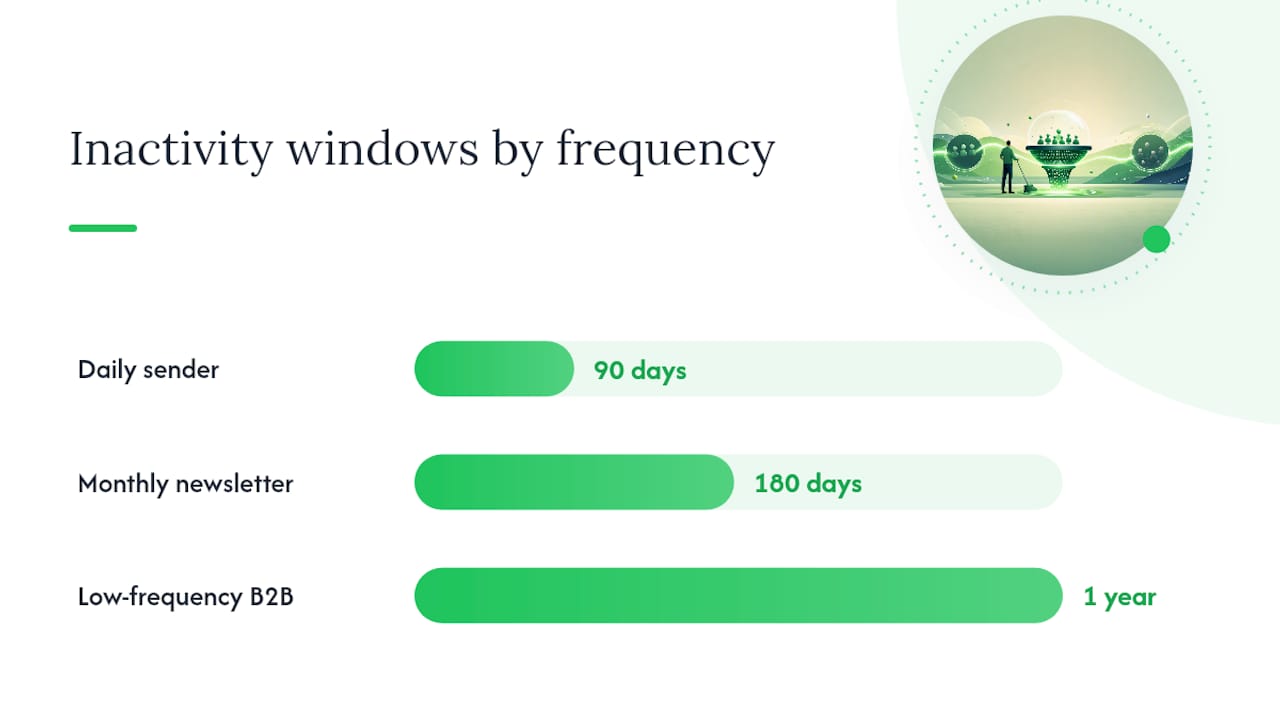
Inactivity windows should track your send frequency. A daily sender might flag someone inactive at 90 days, a monthly newsletter might wait 180 days, and a low-frequency B2B list might extend the window to a full year before triggering a win-back sequence.
- Send message one at the start of the window: a simple "we've missed you" with your best content, no hard sell.
- Send message two a week later with a sharper subject line testing curiosity or urgency.
- Send message three offering a preference-center option: let them choose lower frequency instead of unsubscribing outright.
- Send a final message stating plainly that this is the last email before removal, with one clear action to stay on the list.
Anyone who doesn't respond moves to a suppressed or deleted list rather than lingering in "cold" status indefinitely, which keeps your future campaigns clean by default. Track recovery by tagging the sequence in your platform and measuring opens and clicks against the pre-sequence baseline, not against your whole list average.
How Do You Stop Bad Data at the Signup Stage?
Prevention beats cleanup every time, and the single highest-leverage move most programs can make is verifying addresses at the point of capture. A real-time check on your signup form, catching syntax errors, confirming MX records, and flagging disposable domains, stops bad addresses before they ever enter your database.
- Add inline typo suggestions ("did you mean gmail.com?") to catch the most common entry mistakes without adding friction.
- Reserve double opt-in for higher-risk sources: paid lead generation, giveaways, and partner-sourced traffic, where confirmed consent matters most.
- Single opt-in is generally fine for direct signups from your own site, where the intent to subscribe is already clear.
- Always verify any external or purchased list before your first send. If you're building your list through solo ads or brokered traffic, this step isn't optional. Read more on why list health matters for marketers before you scale any acquisition channel.
- Make sure suppression lists sync across every sending platform you use. A contact suppressed in one tool but still live in another defeats the entire point of cleaning.
Pro Tip: Weigh verification credits against send cost before you import a large external list. Spending a few cents per address to verify is almost always cheaper than the reputation damage from mailing a batch full of dead addresses.
Which Metrics Signal a Hygiene Problem?
Five numbers tell you almost everything about list health, and watching them weekly catches problems before they become reputation damage:
- Hard bounce rate: stay under 0.5 to 1%; anything higher on a single campaign means stop and clean that segment.
- Soft bounce trend: a rising trend over consecutive sends, even below the hard-bounce threshold, signals aging data.
- Spam complaint rate: keep it under 0.1%; mailbox providers treat this as a direct reputation signal.
- Unsubscribe spikes: a sudden jump after a specific campaign usually points to a content or frequency mismatch, not a hygiene issue.
- Engagement decay: falling opens and clicks over time, even without bounces, is the earliest sign your list needs a re-engagement push.
The most common mistakes aren't complicated, they're just avoidable. Marketers re-mail suppressed addresses because suppression lists didn't sync across platforms. They mail role accounts at full frequency without accounting for their higher complaint rates. They treat verification results as a binary pass or fail instead of recognizing "risky" and "catch-all" as their own categories requiring judgment, not automatic deletion.
A Solo Ads Buyer's Perspective on List Hygiene
If you're building your list partly through purchased or brokered traffic, hygiene starts before the list ever reaches your inbox software. Soloadsguide's 21-question vendor vetting framework exists precisely because bad traffic sources create bad list hygiene downstream: fake clicks, disposable addresses, and subscribers who never opted into anything resembling your offer.
Before importing any third-party list, run these checks:
- Ask the vendor for bounce and complaint history from their last several campaigns.
- Request a sample batch and verify it independently before buying the full volume.
- Confirm the vendor's click-tracking claims against your own tracking pixel, not just their reported numbers.
Refuse the sale if any of these show up: unverifiable tracking claims, refusal to share suppression or complaint history, or a sample batch with an unusually high disposable-address rate.
A vendor who won't share bounce and complaint data isn't protecting a trade secret. They're hiding a list that will hurt your sender reputation the moment you mail it.
Why Skepticism Is the Real Hygiene Practice
I'd argue the biggest gap in most list hygiene advice is that it assumes every address entered your database honestly. That assumption falls apart the moment you buy traffic. Verification tools will tell you an address is technically valid, but they can't tell you whether a human who actually wants your emails is behind it. That's a vetting problem, not a technical one, and it's why I built the vendor checklist the way I did: to catch the traffic sources that produce clean-looking, dead-on-arrival lists. Run any purchased list through both layers, verification and vetting, before you trust it.
— Philip Coble
Get the Vetting Checklist and Cleanup Templates
Soloadsguide is the resource for buyers who need to verify a traffic source before they ever touch their sending reputation, not just clean up after a bad purchase.

Beyond the 21-question vendor vetting framework, the site includes templates for tracking bounce and complaint history by source, a breakdown of segmentation strategies by engagement tier, and guidance for readers weighing different types of subscriber lists against their own hygiene policy. None of it promises a specific return on ad spend. It's built for one job: helping you verify a traffic source and your own list health before you spend another dollar on either. Visit Soloadsguide to download the vetting checklist and start applying it to your next list purchase.
Sources
- Senderreputation
- How to Clean an Email List in 2026 - Clay
- How to Clean an Email List in 2026: 7-Step Guide | Cleanlist
- How to Clean an Email List in 2026 - BounceZero
Recommended
- How to Warm Up Your Email Domain With Instantly (2026)
- Why Building an Email List Matters for Marketers
- The Role of Email List in Business Growth
- Small Business Email List Building Tips for 2026
Want Verified Traffic Without the Guesswork?
PulseTraffic screens every seller, filters bot clicks in real time, and shows you verified buyer traffic labels before you spend a dollar.
