

An email subscriber is a person who has explicitly opted in to receive marketing emails from a sender. That opt-in is what separates a subscriber from any other name in your database. Platforms like Mailchimp track this with specific statuses: subscribed (active, can receive marketing emails), unsubscribed (opted out), and unconfirmed/pending (waiting on a confirmation click). A contact, by contrast, is simply any stored record. Your unsubscribed leads, bounced addresses, and imported spreadsheet rows are all contacts. Only the ones who gave permission are subscribers.
Key Takeaways
An email subscriber is a person who explicitly opted in to receive marketing emails, and that consent is what determines who you can legally and effectively reach.
| Point | Details |
|---|---|
| Subscriber requires explicit opt-in | A contact becomes a subscriber only after actively giving permission, not just by being stored in your database. |
| Watch your status labels | Subscribed, unsubscribed, pending, and cleaned each carry different sending rules; only "subscribed" allows marketing sends. |
| Double opt-in improves list quality | Confirmed subscribers produce better engagement and fewer bounces than single opt-in addresses. |
| Never buy lists | Purchased addresses have no consent, generate spam complaints, and damage your sender reputation. |
| Track subscriber counts as a KPI | Subscriber growth and decline signal campaign health more accurately than raw contact totals. |
Table of Contents
- What do the common subscription statuses mean?
- How does someone become an email subscriber?
- How is a subscriber different from a contact?
- Why does subscription status matter for your marketing?
- How can you check and manage your subscription status?
- Why verified subscribers are the only list worth building
- Sources
What do the common subscription statuses mean?
Every major email platform assigns one of a handful of statuses to each contact. Knowing what each one means tells you exactly who you can email and who you cannot.
- Subscribed: The contact opted in and can receive your marketing emails. This is the only status that gives you a green light to send campaigns.
- Unsubscribed / Not subscribed: The person explicitly opted out. Sending to this group violates CAN-SPAM and can trigger spam complaints that damage your sender reputation.
- Unconfirmed / Pending: The address was submitted through a signup form but the person has not yet clicked the confirmation link. This status appears in double opt-in flows. The contact is not yet a subscriber.
- Cleaned: The address hard-bounced or generated repeated soft bounces. Platforms like Mailchimp move these contacts to "cleaned" automatically and stop sending to them.
- Archived: The contact record exists but has been removed from active lists. Some platforms use this instead of deletion.
Pro Tip: Treat "pending" contacts as incomplete signups, not subscribers. Send one reminder confirmation email, then archive or remove contacts who never confirm. Keeping a large pending segment inflates your list count without adding any real audience.
How does someone become an email subscriber?
Subscribers come from deliberate opt-in actions. The method matters because it determines list quality, deliverability, and your legal standing.
- Single opt-in: The person fills out a signup form and is immediately added as a subscribed contact. Fast, but it allows typos and fake addresses through with no filter.
- Double opt-in: After submitting the form, the person receives a confirmation email and must click a link before their status changes to subscribed. Sender that double opt-in typically produces higher-quality, confirmed subscribers with better engagement rates.
- Website and landing page forms: The most common touchpoint. Embedded forms, pop-ups, and dedicated squeeze pages all capture opt-ins this way.
- Purchase flows: A checkbox at checkout (pre-ticked or opt-in, depending on jurisdiction) can add buyers as subscribers. Under GDPR, that checkbox must be unchecked by default.
- In-person and social signups: Trade show tablets, QR codes, and social media lead ads can feed subscribers into your list, provided you document consent.
- Manual adds and imports: You can upload a CSV of contacts, but permission documentation is your responsibility. Importing a list does not create consent.
Never buy or rent email lists. Purchased addresses have not opted in to hear from you. Sending to them generates spam complaints, tanks your sender reputation, and puts you at risk under CAN-SPAM and GDPR. Sequenzy's subscriber glossary makes the point clearly: a subscriber is someone who provided both an email address and permission. One without the other is not a subscriber.
Pro Tip: Before importing any list, document where each address came from and when consent was given. If you cannot answer both questions for a given batch, do not import it.
How is a subscriber different from a contact?
The distinction is permission. Wix support clarifies that subscribers have given explicit permission to receive marketing emails, which operationally separates them from general contacts in any platform.
A contact is any record stored in your email platform:
- An unsubscribed lead who filled out a form two years ago
- A bounced address from an old import
- A customer whose email you collected at checkout but who never opted into marketing
- A team member you added manually for testing
None of these are subscribers. You cannot legally or ethically send marketing campaigns to them. Most platforms bill based on total contacts or total subscribers, so understanding the difference also affects your monthly cost.
Practical implications:
- Who you can email: Subscribed contacts only, for marketing sends.
- List hygiene: Regularly remove or archive cleaned and unsubscribed contacts to keep your active list accurate.
- Platform counts: Some tools count all contacts toward your plan limit; others count only subscribed contacts. Check your platform's billing page so you are not paying for addresses you cannot use.
Why does subscription status matter for your marketing?
Status is not just a label. It drives deliverability, segmentation, legal compliance, and every performance metric you track.
DashThis frames email subscribers as a core KPI, a direct count of people who chose to receive your content and a reliable indicator of marketing reach. Raw contact totals tell you nothing useful. Subscriber counts do.
- Deliverability: Sending campaigns to unsubscribed or cleaned addresses raises your bounce rate and spam complaint rate. Internet service providers use those signals to decide whether your future emails reach the inbox or the spam folder.
- Segmentation: Accurate subscription flags let you split your list by engagement level, purchase history, or signup source. Email segmentation only works when your status data is clean.
- Metrics: Open rates, click rates, and conversion rates are calculated against your subscriber base. A bloated list full of unengaged or invalid addresses makes every metric look worse than it is.
- Legal compliance: CAN-SPAM requires a working unsubscribe mechanism in every commercial email. GDPR requires documented consent before you send to EU residents. Both laws treat "subscriber" as someone who actively opted in.
- List health: AgencyAnalytics recommends tracking subscriber counts over time as a signal of campaign effectiveness. A shrinking subscriber count is a warning sign worth investigating before it becomes a deliverability problem.
Re-engagement campaigns can recover inactive subscribers before you remove them. Send a targeted "still interested?" email to contacts who have not opened in 90 days. Those who do not respond should be archived. Keeping dead weight on your list costs money and hurts your sender score. For a deeper look at why a quality list outperforms a large one, see the role of email list in business growth.
How can you check and manage your subscription status?
Whether you are a user trying to figure out what you signed up for, or a marketer cleaning up a platform, the steps are straightforward.
For users:
- Search your inbox for "welcome" or "confirm your subscription" to find signup sources.
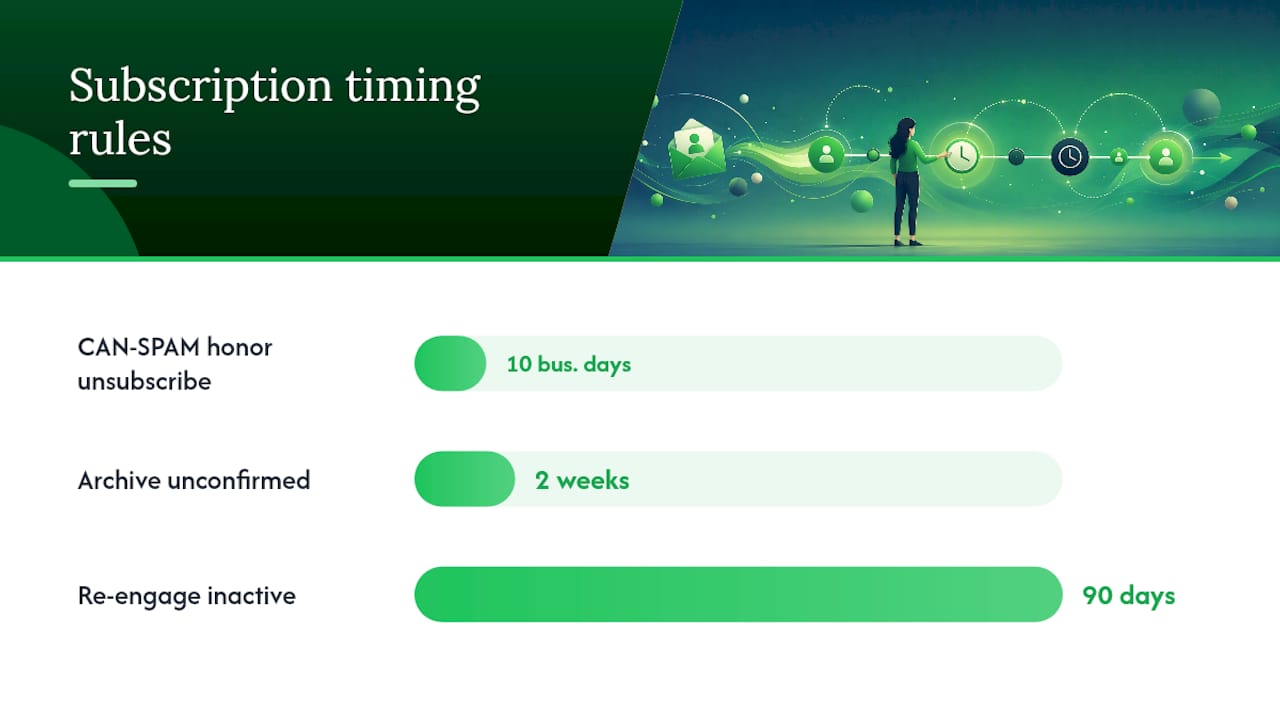
- Open any marketing email and click the unsubscribe link at the bottom. CAN-SPAM requires senders to honor this within 10 business days.
- Check your account settings on services you use. Most platforms list your email preferences under "notifications" or "communication settings."
- Use your email client's unsubscribe feature. Gmail and Apple Mail both surface an "Unsubscribe" prompt at the top of marketing emails.
For marketers:
- Log into your email platform and filter contacts by status: subscribed, pending, cleaned, bounced, unsubscribed.
- Send a re-confirmation email to your pending segment. Archive contacts who do not confirm within two weeks.
- Remove or suppress cleaned addresses. Continuing to attempt delivery to hard-bounced addresses signals poor list hygiene to inbox providers.
- Run a re-engagement campaign for subscribers who have not opened in 90 days. Remove non-responders after the campaign ends.
- If you see unexpected subscription confirmation emails in your own inbox, you may be the target of subscription bombing. This is a tactic where attackers sign an address up for many lists simultaneously. Tangent, Inc. explains the mechanics and recommends investigating repeated sources and blocking them. Report the pattern to your email provider.
Why verified subscribers are the only list worth building
Most people who ask what an email subscriber means are really asking a more practical question: does it matter who is on my list, or just how many? After 11 years in the solo ads industry, the answer is clear. The number means nothing without the consent behind it.
Solo ad vendors sell clicks from their email lists. When you buy traffic, you are effectively renting access to someone else's subscribers. If those subscribers never genuinely opted in, or if the list has been mailed into the ground with no hygiene, your clicks will not convert. The open rates look fine in the vendor's screenshot. The results in your own tracking tell a different story.
The same principle applies when you build your own list. A thousand verified, double opt-in subscribers who signed up for a specific lead magnet will outperform ten thousand scraped or purchased addresses every time. Deliverability holds, engagement stays measurable, and your metrics reflect reality. Soloadsguide's vendor vetting framework exists precisely because list quality is almost never what sellers claim it is. Verify before you spend.
Sources
The following sources were used to support the definitions and guidance in this article. Each is worth bookmarking if you manage an email list or evaluate traffic sources.
- About Your Contacts | Mailchimp
- What is Email Subscription: Definition & All-Inclusive Tutorial
- Email Marketing: Understanding Contacts and Subscribers
Recommended
- Types of Email Subscriber Lists: A Marketer's Guide (2026)
- Types of Email Subscriber Lists: A Marketer's Guide
- What Is a Business Email Campaign? A 2026 Guide
- Email Traffic Lead Generation Benefits for Marketers
Want Verified Traffic Without the Guesswork?
PulseTraffic screens every seller, filters bot clicks in real time, and shows you verified buyer traffic labels before you spend a dollar.
