

Detection tools are only part of the picture. Our guide to checking suspicious leads and apparent sales explains how to compare click flags with genuine customer activity.
What are the best solo ad click fraud prevention tools in 2026?
The strongest defense against solo ad click fraud combines dedicated detection software with pre-purchase vendor vetting. No single tool catches everything. Google and third-party systems together catch only 40–60% of fraudulent clicks, so layered protection is essential.
Here are the top platforms to know, followed by a direct comparison:
- ClickCease: Real-time blocking for PPC and solo ad traffic, with a clean dashboard that makes IP exclusion fast.
- ClickGUARD: Advanced IP and device fingerprinting with granular filter controls, suited for marketers who want precise traffic segmentation.
- Lunio: Machine learning-powered fraud scoring that flags suspicious clicks before they hit your budget.
- TrafficGuard: Automated detection with integrated refund support, covering multiple ad channels simultaneously.
- HUMAN: Enterprise-grade bot mitigation used by large-scale advertisers and integrated directly into Google Ad Manager.
- DoubleVerify: Full-stack ad quality verification across display, video, and programmatic channels.
- Integral Ad Science (IAS): Viewability and fraud detection focused on impression quality.
- ClickGuardian: Heuristics built specifically for solo ad traffic patterns, with real-time fraud alerts.
- Huntress: Cybersecurity-level threat detection for advertisers needing enterprise monitoring.
- Improvado: A data aggregation platform that combines fraud detection with cross-channel analytics reporting.
- The Solo Ads Guide: A niche marketplace that vets solo ad vendors before listing them, targeting affiliate marketers who want verified tier-1 traffic.
Quick safety tips used by experienced solo ad buyers:
- Always start with a test buy of 100–200 clicks before scaling to 500 or more.
- Require tracking links with unique click IDs from every vendor.
- Check opt-in rates within 24 hours of delivery; a zero-conversion result on 100+ clicks is a red flag.
- Use IP exclusion lists and geo-targeting filters in your tracker from day one.
- Ask vendors directly about their click replacement policy before sending payment.
| Tool | Best For | Pricing | Detection Techniques | Platform Compatibility | Solo Ad Features | Support Quality |
|---|---|---|---|---|---|---|
| ClickCease | Comprehensive bot detection | Tiered plans | IP exclusion, behavioral analysis, real-time blocking | Google Ads, Facebook Ads | Real-time blocking dashboard | Live chat, email |
| ClickGUARD | Granular traffic filtering | Tiered plans | IP/device fingerprinting, custom filters | Google Ads | Advanced filter controls | Email, knowledge base |
| Lunio | Machine learning fraud defense | Custom pricing | ML fraud scoring, anomaly detection | Google, Meta, programmatic | Fast real-time scoring | Dedicated account manager |
| TrafficGuard | Cost recovery and refund support | Tiered plans | Automated detection, billing protection | Multi-channel | Refund integration | Email, live support |
| HUMAN | Enterprise bot mitigation | Enterprise pricing | Sophisticated bot verification | Programmatic, Google Ad Manager | Industry-leading bot filtering | Enterprise support |
| DoubleVerify | Holistic ad verification | Custom/enterprise | Full-stack fraud, viewability, brand safety | All major digital platforms | Comprehensive reporting suite | Dedicated CSM |
| Integral Ad Science (IAS) | Viewability and impression quality | Custom pricing | Viewability metrics, fraud detection | Display, video, programmatic | Impression-level fraud filtering | Enterprise support |
| ClickGuardian | PPC and solo ad fraud alerts | Tiered plans | Solo ad heuristics, real-time alerts | Google Ads | Solo ad-specific algorithms | Email, chat |
| Huntress | Enterprise security monitoring | Enterprise pricing | Cybersecurity threat detection | Cross-platform | Deep threat intelligence | 24/7 SOC support |
| Improvado | Unified marketing analytics | Custom pricing | Fraud detection via data aggregation | Multi-channel | Cross-channel fraud reporting | Dedicated support |
| The Solo Ads Guide | Verified solo ad vendor sourcing | Free to use | Pre-purchase vendor vetting | Solo ad marketplaces | Tier-1 traffic verification | Community + editorial |
What is solo ad click fraud and why does it matter?
Click fraud in solo ads happens when clicks on your ad link are generated by bots, click farms, or recycled traffic rather than real, interested people. You pay for those clicks at the same rate as genuine ones, but they produce zero opt-ins, zero sales, and zero downstream value.
Solo ads work differently from display or search advertising. You pay a vendor to send your offer to their email list, and you receive clicks from that send. The problem is you have no direct visibility into who is on that list or how those clicks are generated. That information gap is exactly where fraud enters.
The most common fraud types in solo ad campaigns include:
- Bot traffic: Automated scripts that click your link repeatedly, inflating click counts with no human behind them. Bot traffic shows up as sudden click spikes, identical IP clusters, zero conversions, and very short session durations.
- Recycled traffic: Clicks from exhausted lists that have seen the same offers dozens of times, producing real humans who have no interest in your niche.
- Fake opt-ins: Automated form submissions that populate your list with invalid email addresses, damaging your autoresponder deliverability over time.
- Repeated IP clicks: Multiple clicks from the same IP address, sometimes from a single person clicking repeatedly, sometimes from a small click farm.
- Competitor interference: Less common in solo ads than in PPC, but some bad actors click rivals' links to drain their budgets.
Fraudulent clicks waste your budget without generating real leads. Beyond the direct cost, they distort your performance metrics, making it harder to judge whether your funnel, your copy, or your offer needs work.
How does click fraud detection software actually work?
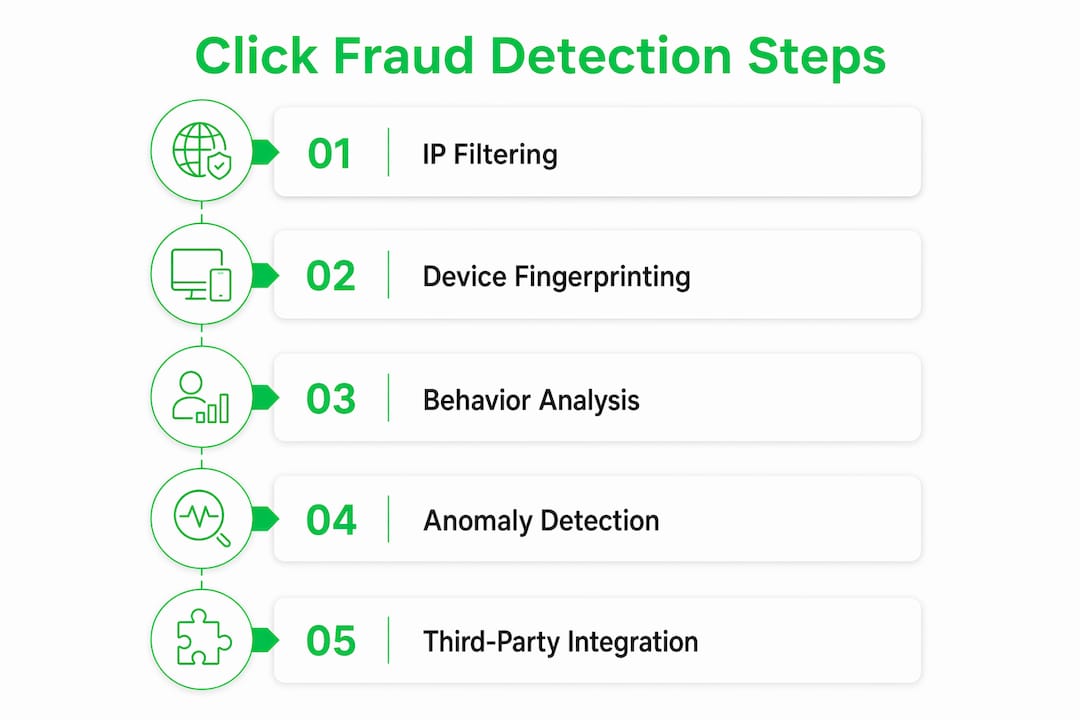
Detection software sits between the click and your landing page, analyzing each visitor before or immediately after they arrive. The core methods are IP and device fingerprinting, behavioral analysis, and anomaly detection.

IP and device fingerprinting identifies visitors by their IP address, browser configuration, operating system, and device characteristics. When the same fingerprint appears multiple times in a short window, the software flags or blocks it. This catches click farms operating from fixed IP ranges and repeat clickers using the same device.
Behavioral analysis goes deeper. It measures session duration, scroll activity, mouse movement, and whether the visitor interacts with your page at all. A bot that clicks and immediately bounces leaves a distinct behavioral signature: zero scroll depth, zero time on page, no form interaction. Humans, even disinterested ones, behave differently.
Anomaly detection watches for statistical outliers in your traffic stream. A sudden spike of 300 clicks in 20 minutes from a single geographic region, when your normal rate is 10 clicks per hour, triggers an alert regardless of whether individual IPs look suspicious.
Most platforms also integrate with third-party trackers like ClickMagick, Voluum, or Google Analytics to correlate click data with session data. Reputable vendors provide tracking links with unique click IDs and raw click logs that these tools can cross-reference to confirm whether clicks produced real sessions.
| Detection Technique | What It Catches | Limitation |
|---|---|---|
| IP exclusion lists | Fixed-IP click farms, repeat clickers | Rotating proxies bypass static lists |
| Device fingerprinting | Same device, multiple clicks | Sophisticated bots spoof device data |
| Behavioral analysis | Bots with zero engagement | Advanced bots mimic human behavior |
| Anomaly detection | Traffic volume spikes | Slow, distributed fraud evades thresholds |
| Session validation | Clicks with no real session | Requires analytics integration |
| Geo-targeting filters | Off-target geographic traffic | May block legitimate international visitors |
The honest limitation: even the best tools miss sophisticated fraud that mimics genuine human behavior with realistic session depth, varied timing, and residential IP addresses. That is why pre-purchase vendor vetting combined with post-click technical detection remains the only complete strategy.
Which features matter most in a click fraud prevention tool?
Not every feature listed on a vendor's pricing page translates to real protection for solo ad campaigns. A few capabilities make a measurable difference; the rest are table stakes.
Live click tracking with unique click IDs is the foundation. Without it, you cannot audit delivery or dispute invalid traffic with your vendor. Any tool worth using captures raw click timestamps, referrer data, and session correlation in real time.
IP exclusion and ASN-level blocking lets you remove not just individual bad IPs but entire hosting provider ranges that commonly serve bot traffic. This is more effective than single-IP blocking against distributed click farms.
Geo-targeting enforcement restricts traffic to the countries your offer actually serves. For US-focused affiliate funnels, tier-1 traffic from the US, Canada, UK, Australia, and New Zealand converts at a meaningfully higher rate than lower-tier geographies.
Vendor dispute support is underrated. The best tools generate audit reports formatted for refund or replacement requests, with timestamped click logs and fraud scores that give you documented evidence when a vendor disputes your claim.
Additional features worth prioritizing:
- Replacement click policy tracking (flag vendors who fail to honor their stated policies)
- Integration with your existing tracker or autoresponder
- Real-time alerts when fraud thresholds are crossed mid-campaign
- Detailed reporting broken down by IP, device type, geography, and time of day
- Scalability to handle larger click volumes as you grow
Pro Tip: Before subscribing to any fraud detection tool, confirm it exports raw click logs in a format you can share with vendors. A fraud score alone is not enough for a dispute; you need the underlying data.
How to implement click fraud prevention software step by step
Getting a tool installed is straightforward. Getting it configured correctly for solo ad traffic takes a few extra steps that most guides skip.
-
Connect your tracking link. Every solo ad send should go through a tracking URL generated by your fraud detection tool, not a direct link to your squeeze page. This captures click data before the visitor reaches your page.
-
Set your geo-targeting rules. Define which countries are acceptable for your offer. Block everything else at the tracker level, not just in your ad settings.
-
Build your IP exclusion list. Start with known bad IP ranges from your tool's built-in blocklist, then add any IPs flagged during your first test buy.
-
Configure alert thresholds. Set a notification for any campaign where clicks exceed your expected hourly rate by more than double. Early alerts let you pause a send before the damage compounds.
-
Run a test buy first. Start with 100–200 clicks from a new vendor before committing to larger orders. Review your fraud tool's report within 24 hours of delivery.
-
Cross-reference with your analytics. Export your click log and compare it against your Google Analytics or GA4 session data. Clicks that do not produce corresponding sessions are invalid by definition.
-
Document everything. Save fraud reports for every campaign. If you need to dispute a delivery with a vendor, timestamped logs are your only leverage.
What should you do immediately after detecting click fraud?
Speed matters. The longer a fraudulent traffic source keeps running, the more budget it drains and the more it corrupts your performance data.

Step 1: Pause the campaign or traffic source. Stop the bleed first. If you are mid-delivery on a solo ad order, contact the vendor immediately and request a pause.
Step 2: Export your click logs. Pull the full raw log from your fraud detection tool, including IP addresses, timestamps, session durations, and fraud scores. This is your evidence.
Step 3: Block the offending IPs. Add flagged addresses to your IP exclusion list in both your tracker and your ad platform. For clusters of IPs from the same hosting provider, apply ASN-level blocking.
Step 4: Contact the vendor with documentation. Send the vendor your fraud report and request replacement clicks or a credit. Genuine vendors have pre-defined replacement policies for invalid traffic. A vendor who refuses to engage with documented evidence is one you should not use again.
Step 5: File a report with your ad platform. If the fraud affected a Google Ads or Meta campaign, submit a manual invalid traffic report with your evidence. Google issues credits, not cash refunds, and only for verified cases.
Step 6: Recalculate your actual ROI. Remove the fraudulent click count from your totals and recalculate your real cost per lead and conversion rate. This gives you an accurate baseline for your next campaign.
How to optimize solo ad campaigns after detecting fraud
Cleaning up fraud is only half the job. The other half is rebuilding your campaign data so future decisions are based on real performance, not inflated click counts.
Audit your vendor list. Any vendor whose traffic triggered your fraud detection tool should be flagged. Run a second small test before using them again, and apply stricter geo-targeting and IP exclusion rules to that test. Successful solo ad buyers prioritize sellers who demonstrate transparency and clear list-building methods over those offering the lowest price per click.
Recalibrate your funnel metrics. Your opt-in rate, cost per lead, and earnings per click all need to be recalculated using only verified human clicks. A funnel that appeared to convert at 10% may actually convert at 18% once bot traffic is removed. That distinction changes which offers you scale.
Tighten your targeting before the next send. Use what you learned from the fraud report to narrow your geo-targeting, add new IP exclusions, and update your tracker's blocklist. IP exclusion and geo-targeting act as frontline defenses that reduce the surface area bots can exploit on future campaigns.
Test a different vendor with the same offer. If your funnel metrics improve significantly with a new vendor, that confirms the problem was the traffic source, not your copy or landing page. Scale the vendor who delivers real results, and walk away from the one who didn't.
Set a monitoring cadence. Weekly reviews of click logs and monthly deep audits of your vendor roster keep fraud from quietly returning. The marketers who lose the most to click fraud are the ones who check their campaigns only when something feels wrong.
Soloadsguide offers a different starting point for solo ad buyers
Most click fraud tools assume you are already buying traffic and need to filter the bad from the good. Soloadsguide takes a different approach: it vets vendors before you spend a dollar, so the traffic you buy starts from a higher baseline of quality.

Rather than paying for a fraud detection subscription and then hoping your vendor delivers clean traffic, Soloadsguide gives you access to a curated list of verified solo ad providers with documented tier-1 traffic and conversion track records. The platform is built specifically for affiliate marketers who want to skip the trial-and-error phase of vendor testing. It does not replace a fraud detection tool for active campaign monitoring, but it significantly reduces the odds that you need one in the first place. If you are spending money on solo ads and still unsure whether your vendor is sending real traffic, Soloadsguide is a practical first stop before you commit to a larger budget.
Key Takeaways
Layered click fraud prevention combining pre-purchase vendor vetting and real-time detection software gives solo ad buyers the most complete protection against wasted spend in 2026.
| Point | Details |
|---|---|
| Detection gaps are real | Google and third-party tools together catch only 40–60% of fraudulent clicks, making layered defense necessary. |
| Test buys protect your budget | Always start with 100–200 clicks from a new vendor before scaling to 500 or more. |
| Vendor vetting comes first | Transparent vendors with clear replacement policies and raw click logs are the foundation of fraud prevention. |
| Software fills the gaps | Tools like ClickCease, ClickGUARD, and Lunio add real-time IP blocking and behavioral analysis that manual vetting cannot replicate. |
| Soloadsguide reduces upfront risk | Soloadsguide's pre-vetted vendor marketplace helps affiliate marketers source verified tier-1 traffic before fraud becomes a problem. |
Recommended
- What Does Click Fraud Mean in Digital Ads? (2026 Guide)
- Solo Ad Click Tracking Explained for Affiliate Marketers
- Why Solo Ad Vendors Inflate Click Counts: 2026 Guide
- Why Your Solo Ads Are Failing (2026 Fixes That Scale)
Want Verified Traffic Without the Guesswork?
PulseTraffic screens every seller, filters bot clicks in real time, and shows you verified buyer traffic labels before you spend a dollar.
