

Time zone tracking for solo ads means choosing one reporting time zone in your click tracker, writing it down, and using it to compare your click log with what the vendor says was sent and when. The clicks themselves do not change. What changes is the hour and the calendar date each click lands in, and that is enough to make an honest delivery look short, or a slow one look fine. Set the zone first, then judge the numbers.
This guide is for buyers who want to check a delivery themselves: beginners who are not sure what to look at, and marketers who have already been burned and want proof before they spend again.
TL;DR
- A time zone setting only moves clicks between hours and dates. It never adds or removes clicks.
- Pick one reporting zone, record it before your order starts, and ask the vendor which zone their report uses.
- Compare individual click records (time, zone, click ID, country, device), not just daily totals.
- Timing patterns are one signal. A gap between clicks and landing page visits has ordinary causes and is not proof of fraud on its own.
- Start with a small order so your tracking tells you something before you scale.
Table of Contents
- What time zone tracking actually does
- Why the clock matters when you buy solo ads
- How trackers decide which time zone to show
- Setting up time zone tracking before your order
- Comparing your clicks with the vendor's claimed delivery
- What timing patterns can and cannot tell you
- A short checklist for every delivery
- Where to buy once your tracking is ready
- Our perspective
- FAQ
- Sources
What time zone tracking actually does
Every click your tracker records has an exact moment. The report you read groups those moments into hours and days, and that grouping depends on the time zone selected. TUNE's documentation explains that changing the report time zone re-buckets events rather than changing when clicks actually happened. A click at 11:30 p.m. in one zone is a click at 2:30 a.m. the next day in a zone three hours ahead.
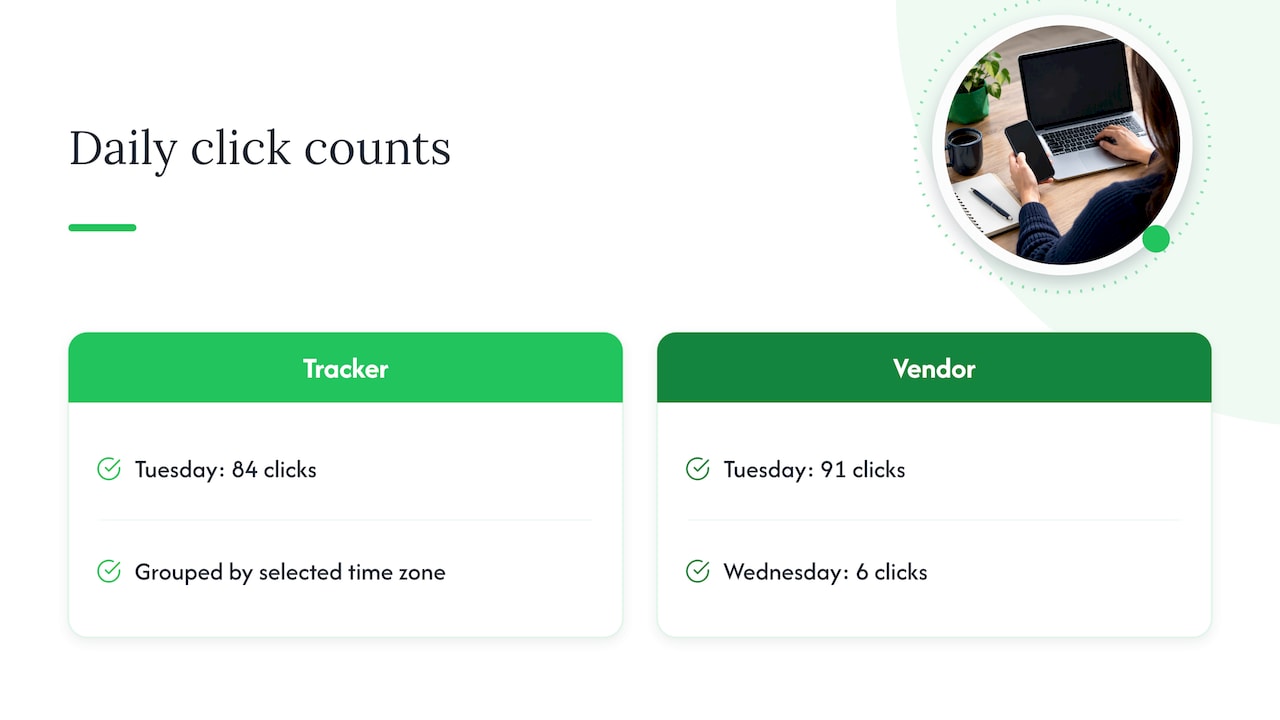
That is why two honest systems can disagree. Your tracker may show 84 clicks on Tuesday while the vendor's report shows 91 for Tuesday and 6 for Wednesday. Nobody miscounted. The two reports simply cut the day at different midnights.
If you are new to the basics, our solo ad click tracking explainer covers how links, redirects and counts fit together. This article covers just the clock.
Why the clock matters when you buy solo ads
A solo ad is a single email sent to someone else's list, with one link to your page. Vendors usually promise a number of clicks delivered over a window, such as a day or two. Three things in that arrangement depend on time:
- Delivery window. You want to know whether the clicks arrived when you were told they would.
- Daily totals. Reports for "day one" and "day two" only match if both sides use the same midnight.
- Conversion timing. Opt-ins and sales that happen later get reported by their own time, not the click's.
The third point trips up many buyers. ClickMagick's API documentation says event-time breakdowns place a sale at the time the sale happened, not at the time of the click it is credited to. So a report by click date and a report by conversion date answer different questions. If you want to know how long buyers take to act, read our realistic solo ad conversion timeline.
How trackers decide which time zone to show
Tracking tools do not all handle time the same way, so find out how yours does before the order starts.
- Project or account setting. ClickMagick's API documentation describes a project time zone, written with names such as America/New_York, and says day, hour, weekday and month breakdowns follow it. A report for a whole day needs boundaries that reflect midnight in that zone.
- Stored in UTC, displayed in your zone. TrackCrown's reporting documentation says its raw data is stored in UTC while report groupings use the workspace or viewer-selected time zone, which is printed on the report.
- Different zones for different files. Google Ad Manager's Data Transfer help says event timestamps use the publisher's network time zone, while hourly file names use Pacific time, and tells users to rely on the event timestamp, not the file name.
The lesson is the same in each case: a number without a zone attached is ambiguous. If a screenshot, export or vendor message does not state the zone, treat it as unverified until you know.
Which zone should you pick?
For a U.S. buyer, Eastern time is a sensible default. The IAB's U.S. campaign reporting guideline (published in 2004, and a recommendation rather than a compliance rule) recommends disclosing the reporting time zone and using Eastern time for U.S.-based reports. The principle matters more than the choice: pick one zone, state it, and keep it for the whole campaign. Changing it halfway makes your own history impossible to compare.
Setting up time zone tracking before your order
Do this before you send any money, because you cannot rebuild missing context afterward.
- Set the tracker's time zone. Open your tracking account settings and choose one zone. Write it in your notes with the date.
- Create a unique tracking link for this order. One link per vendor and per campaign keeps one delivery from blurring into another. Our guide to setting up a solo ad analytics dashboard walks through the build.
- Confirm the redirect works end to end. Click your own link and make sure it reaches the landing page, ideally from a phone as well as a computer.
- Ask the vendor which zone their report uses. Do it in writing before the send. It takes one line, and it removes the most common cause of arguments later.
- Choose the order size carefully. A small first order is enough to check timing, geography and device patterns without much at stake.
- Decide your reporting window. For example, "the send date plus the next 48 hours, in Eastern time." Stick to it.
If you track sales or opt-ins back to the click, your setup also needs a working postback. Our 50 to 250 click test for postback setup shows how to confirm that before you scale.
Comparing your clicks with the vendor's claimed delivery
Here is a worked example. The numbers are illustrative, not from a real campaign.
A vendor tells you the 100 clicks they sent started going out on Tuesday evening and finished by Wednesday morning. Their report is in Pacific time. Your tracker is set to Eastern, which is three hours ahead of Pacific.
| Vendor report (Pacific) | Your tracker (Eastern) |
|---|---|
| Tue 8:00 p.m. to 11:59 p.m.: 61 clicks | Tue 11:00 p.m. to Wed 2:59 a.m.: 61 clicks |
| Wed 12:00 a.m. to 9:00 a.m.: 39 clicks | Wed 3:00 a.m. to Wed 12:00 p.m.: 39 clicks |
Seen by calendar day, your tracker shows a few clicks on Tuesday and nearly all on Wednesday, while the vendor shows most clicks on Tuesday. Converted to the same zone, the two reports agree. The method TUNE recommends is to select the other system's time zone and the same date range, then compare the hourly counts.
When you compare:
- Match the date range and time zone first.
- Compare unique clicks with unique clicks and total clicks with total clicks. TUNE's click discrepancy guide separates the two because one person can click repeatedly.
- Allow for reporting delay. Even a large ad platform says most event data in its Data Transfer files arrives 5 to 15 hours after the recorded hour, with some delayed events up to 8 days later. Check again the next day before drawing conclusions.
Ask for the click log, not just a total
A total can hide a lot. Affise's troubleshooting guide says a click log used for reconciliation should include date, time, time zone, click ID, user agent, geography and IP-related data. With those fields both sides can compare individual events instead of arguing over dashboard totals. Our buyer's guide to solo ad click logs explains what to look for, and the guide to matching impression IDs and logs shows how proof of clicks works in practice.
What timing patterns can and cannot tell you
Once your zones line up, timing becomes a useful signal. It is one signal among several, and it works best layered with the others.
What to look at
- Delivery shape. Email clicks usually come in a burst after the send and then taper. A perfectly flat line of clicks every minute for hours deserves a closer look.
- Clicks outside the stated window. Clicks arriving days after a one-day send may be normal for email, which people open late, but note them.
- Geography and device against timing. If a burst of clicks comes from countries you did not target, or from one device type, the click-level fields show it. TrackCrown describes searchable click-level records with country, device, traffic source, bot or data-center flags and exportable logs for this kind of investigation.
- Repeat clicks. Many clicks from the same address in a short span point to duplicates rather than distinct people.
What it cannot settle
A gap between clicks and landing page visits is not automatically fraud. The IAB guideline cautions that click counts are not the same as destination-site referrals, because latency, people abandoning the redirect and other measurement differences separate the two. It also says click-through counts should be filtered for robotic activity. HUMAN Security's 2025 industry guide lists ordinary causes of drop-off, including latency, accidental taps, incorrect tagging and redirect timeouts, and favors layering redirect checks with post-click behavior.
So before you blame traffic quality, rule out your own setup. TUNE suggests matching date range and time zone, checking targeting settings, inspecting server logs and confirming the redirect chain reaches the destination. Affise adds checking the full redirect chain, the HTTP 302 redirect setup, geography and operating system restrictions, and consistent HTTP or HTTPS. Our guide to click mismatches in solo ads turns these checks into a routine.
The same habit of asking what each report actually counts applies well beyond solo ads, for example in AI Overview tracking, where two tools can report different numbers for the same period.
A short checklist for every delivery
- Reporting zone recorded before the send, for both your tracker and the vendor's report.
- Date range for the comparison written down.
- Unique and total clicks compared separately.
- Hourly counts converted to the same zone.
- Click log exported with time, zone, click ID, country and device.
- Redirect and landing page tested end to end.
- Results rechecked after the reporting delay has passed.
If you also want to understand where unexplained visits come from, see how to track direct website traffic and fix misattribution. Mobile clicks that continue on a laptop are covered in cross-device tracking for solo ads.
Where to buy once your tracking is ready
Tracking does its job when you have something to measure. If your link, redirect and time zone are set and you are ready to place a first order, our solo ad buying page lays out the process, and you can place an order through this order page while you keep your own tracking in place.

Whatever you choose, run the same routine: unique link, stated time zone, small first order, click log review. Our 21-Question Vendor Vetting Framework on Soloadsguide covers the questions to settle before any money moves.
Our perspective
Most arguments between buyers and sellers about "missing clicks" come down to two reports that were never put on the same footing. I have been a solo ads vendor for 11 years, and the buyers who get the clearest answers are the ones who set a time zone, used a unique link, and kept a click log before the send.
That is why SoloAdsGuide.com is written the way it is. We assume sellers overpromise, so we teach you to verify instead of trust. A time zone setting is a small thing, but it is exactly the kind of detail that separates a real check from a hunch.
Our advice is simple: track every click, vet the vendor, and size your first order so the data can teach you something. We never promise income or returns from traffic, because no one can verify that in advance. What you can verify is what arrived, when, and from where.
Philip Coble
FAQ
Does changing my tracker's time zone change my click count?
No. It only changes which hour and date each click is grouped into. TUNE's documentation describes this as re-bucketing events, so totals for a long range stay the same while daily totals can shift.
Which time zone should I use for solo ad reports?
Use one zone for the whole campaign and write it down. For U.S. reporting, Eastern time is the zone the IAB guideline recommends, and the more important point is disclosing whichever zone you use. Ask the vendor which zone their report uses before the send.
Why does my tracker show fewer visitors than clicks?
A click is not the same as a loaded landing page. Slow pages, abandoned redirects, accidental taps and tagging errors all cause drop-off, as HUMAN Security's guide notes. Check your redirect chain and compare unique clicks first, then look at geography, device and repeat-click patterns.
Can timing alone prove a vendor sent bad traffic?
No. Timing is a clue, not proof. Odd delivery shapes, clicks from untargeted countries and heavy repeat clicks together give you a stronger picture, and a click log with time, zone and click ID lets you check individual events.
Sources
- Report Timezones and Timeframes, TUNE
- Resolving Click Discrepancies, TUNE
- Clicks discrepancy with affiliates: solutions, Affise Help Center
- Google Ad Manager Data Transfer reports
- ClickMagick API documentation
- Reporting and analytics, TrackCrown
- Interactive Audience Measurement and Advertising Campaign Reporting and Audit Guidelines, IAB
- Click Fraud in Digital Advertising: An Industry Guide, HUMAN Security
- AI Overview Tracking: How to Measure Your Visibility
Recommended
- Solo Ad Send Times for Affiliate Marketers: Verify 100 Clicks First
- How to Track Solo Ad Traffic (Catch Low-Quality Clicks)
- Solo Ad Click Tracking Explained for Affiliate Marketers
- Solo Ad Click Logs: A Buyer's Guide to Verifying Traffic
Want Verified Traffic Without the Guesswork?
PulseTraffic screens every seller, filters bot clicks in real time, and shows you verified buyer traffic labels before you spend a dollar.