

A click cap is a ceiling on the number of clicks attached to a solo ad order. Sometimes the seller sets it as the quantity they will deliver. Sometimes you set it in your click tracker so the offer stops counting or redirects traffic after a certain number. The two are easy to mix up, and mixing them up is how buyers end up paying for clicks they cannot verify or losing clicks they paid for. This guide explains both meanings, how caps are enforced, and how to write one into your order so the traffic is easy to check.
TL;DR
- A click cap can mean the number of clicks a seller agrees to deliver, or a limit you set in your tracker. Confirm which one is being discussed before you pay.
- Trackers enforce caps differently. A hard cap stops tracking at the limit. A soft cap only sends an alert and traffic keeps flowing.
- Caps are not instant. Expect a few spillover clicks past the limit, and set a daily cap alongside any monthly or total cap.
- A delivered click count says traffic arrived. It does not say the clicks were unique, human or interested. Verify with your own tracking.
- Put the cap, the delivery window and the definition of a countable click in writing, and start with a small order.
Table of Contents
- What "click cap" means when you buy solo ads
- How click caps are enforced in tracking software
- How a cap changes pace, timing and cost
- What a delivered click does and does not tell you
- When your count and the seller's count disagree
- How to set a click cap before you buy
- Questions to ask a seller about their cap
- Perspective: the cap is your first tracking tool
- Where to buy once your tracking is ready
- FAQ
- Sources
What "click cap" means when you buy solo ads
A solo ad is a single email sent to a seller's list with one call to action: your link. You pay for the clicks that email produces. A cap is simply a number that limits those clicks. Where that number lives changes what it does for you.
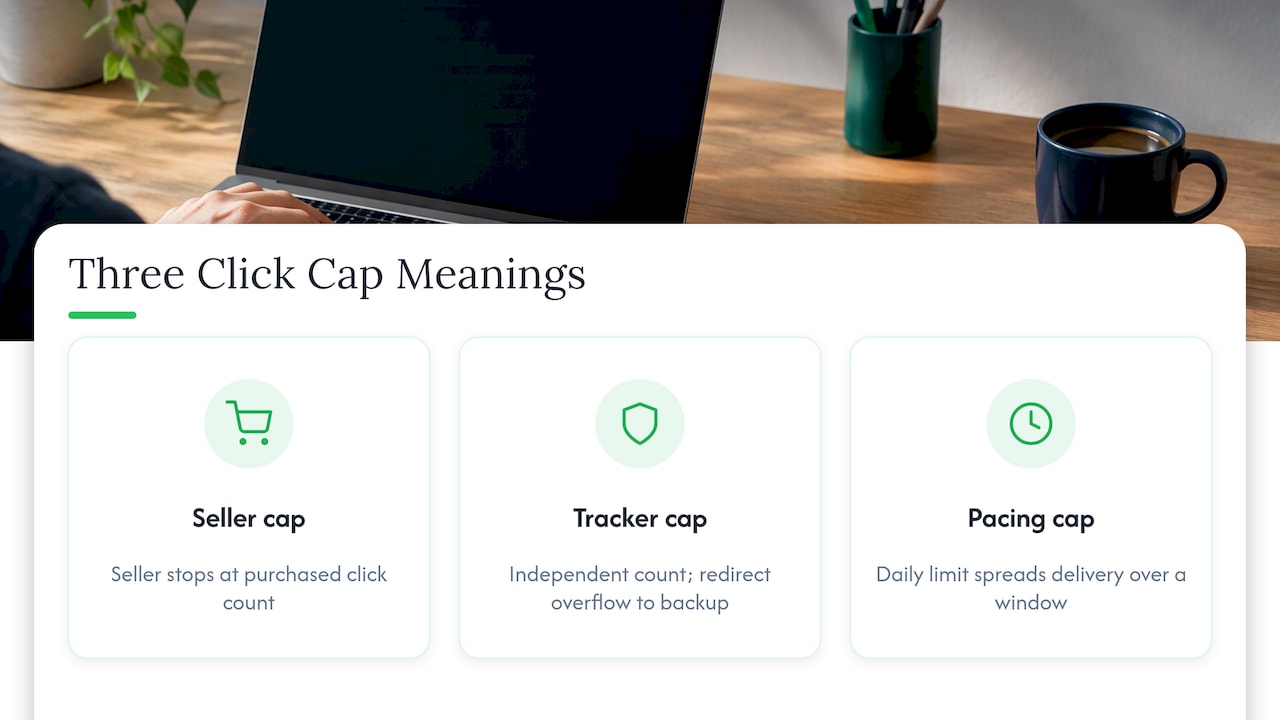
1. The seller's order cap. You buy a set number of clicks, say 100 or 250. The seller sends until their count reaches that figure and then stops. This is the quantity you are paying for, so it is really a purchase size. Ask whether the order is for clicks or for the number of recipients mailed, because the second does not promise any click volume at all.
2. The tracker cap. Click tracking software lets you set a limit on an offer: a number of clicks per day, week, month or in total. When it is reached, the tool does something you chose, such as send further visitors to a backup page. This protects your budget and your landing page, and it gives you a second, independent count.
3. A pacing cap. Some buyers and sellers also agree on a daily limit so the clicks arrive over a window rather than all at once. Spreading delivery makes odd bursts easier to spot in your logs.
The same words can describe all three, so never accept "capped at 200" without asking: capped by whom, counted where, and over what period? If the seller counts clicks in one system and you count in another, the two numbers will rarely match exactly. Our guide on why click counts differ and what to do covers that gap in detail.
How click caps are enforced in tracking software
Because the tracker cap is the one you control, it helps to know how the tools behave. The documentation of several tracking platforms agrees on the basics and differs on the details.
Hard caps and soft caps
Everflow's help center distinguishes hard caps from soft caps. A hard cap stops tracking as soon as the limit is reached, and traffic after that point is marked as invalid clicks. A soft cap only sends an alert and lets traffic continue. If you want to protect a budget or a limited-capacity offer, you want the hard version. If you just want a heads-up, soft is enough, but it will not stop anything.
Where the extra clicks go
TrackCrown's documentation says caps are set per period (daily, weekly, monthly or total) on the offer. Once a limit is hit, further clicks are routed to a fallback with the reason recorded as "cap", or to a fail route. Server-side clicks get an error code that reads "click cap reached". That recorded reason is useful: you can later see exactly how many visitors arrived after the limit and what happened to them.
AdTrack describes the same idea in daily terms: once a set number of clicks is logged for the day, additional clicks go to a fallback, and the count resets at midnight UTC. Note the time zone. If you live in the US and the reset happens at midnight UTC, your "daily" window ends in the evening or afternoon, depending on the time of year. Check which zone your tool uses before you plan a 24-hour campaign around it.
Caps take a moment to work
Trackier's guide explains that a cap takes about 5 to 10 minutes to activate and pause delivery, so some spillover clicks are expected. It also notes that daily caps are checked continuously, while monthly and lifetime caps are checked every half hour and are not enforced in real time. Its advice is to pair any monthly or lifetime limit with a daily cap for tighter control.
For a solo ad buyer this matters because email traffic is bursty. A good share of clicks can land in the first minutes after a send. If your cap is 200 and the email lands in a big wave, your logs may show 215 or 230. That is normal tool behavior, not necessarily a vendor problem. Plan for a little slack in both directions.
How a cap changes pace, timing and cost
A cap does not make a seller send faster or slower on its own, but it shapes the order in three ways.
Pace. A daily cap turns an order into a daily volume. A 300-click order with a 100-click daily cap runs over about three days if the seller sends steadily. Without a daily limit, the same order might finish in a few hours.
Completion time. If the seller's list produces clicks slowly, a cap that is too high for the window leaves you with an unfinished order. Agree on a delivery window (for example 72 hours from the send) so you both know when the order is considered complete.
Cost. Because you pay per click, the cap is also your maximum spend at the agreed price. A smaller cap limits your exposure to a seller you have not tested. Larger orders often come with a lower price per click, but you should earn that bigger order with a small one first. Our 50 to 250 click test shows how to size that first order.
A useful side effect: when you set the tracker cap equal to the order size, anything beyond it shows up as a labelled overflow instead of vanishing into your totals. You can see at a glance whether you received more than you paid for, and whether the seller's report and your log agree.
What a delivered click does and does not tell you
A cap controls quantity. It says nothing about quality. Hitting 200 clicks on the dot can still mean 200 low-value visits. Before you judge the order, separate three questions.
- Did the clicks arrive? Your tracker log answers this.
- Were they real, unique people? This needs filtering and pattern checks.
- Did they become subscribers or buyers? Only your opt-in and sales data can answer.
The Interactive Advertising Bureau (IAB), the main US digital advertising trade body, defines invalid traffic as traffic that fails quality criteria or is not legitimate, including bots and spiders and activity designed to produce such traffic. A raw count includes all of it unless you filter.
Signs worth checking in your log:
- Burst timing. Hundreds of clicks inside a few minutes, with identical or near-identical timestamps.
- Device and location mismatch. A US-only order whose clicks come from a handful of unrelated regions, or from one device type.
- Behavior after the click. Near-instant exits with almost no time on the page, and no scrolling.
- Repeat IPs. Many clicks from the same address or range.
No single sign proves fraud, and repeat visits are sometimes legitimate. But a pattern across several of them tells you to slow down. Our guides on reading solo ad click logs and tracking solo ad traffic walk through the setup step by step.
The bigger point is to judge an order on outcomes, not delivery alone. A seller can deliver exactly the clicks you paid for while the order produces no useful subscribers. If you want a plain explanation of how leads are sold and bought, it helps frame why delivery numbers and outcomes are two different scorecards.
When your count and the seller's count disagree
They will, at least a little. The seller counts in their system, you count in yours, and each tool treats duplicates, bots and slow-loading redirects differently. The question is how big the gap is and which direction it goes.
The IAB's May 2026 direct buy terms offer a reference point from the wider ad industry. They say that when the difference between the controlling measurement and another source exceeds 10% over the invoice period and the controlling number is lower, the parties should reconcile in good faith. The same document limits over-delivery on a capped placement to 10% above the contracted amount without written consent when a third-party ad server is used. Those terms were written for display and direct media buys, not solo ads, so treat them as a benchmark rather than a rule. But a 10% tolerance is a sensible number to write into your own order.
A practical way to handle a gap:
- Name your tracker as the count of record in the order before you pay.
- Compare the seller's report and your log for the same time window and time zone.
- If the gap is under your agreed tolerance, move on to quality checks.
- If it is over, look at what the missing or extra clicks have in common: time, source, device, repeat IPs.
- Hold off on a bigger order until the pattern is explained.
This keeps the conversation about data, not opinions. It also keeps your next purchase decision in your hands.
How to set a click cap before you buy
Treat the order as a short written agreement. Before you send payment, settle each of these in plain language, in a message or order note you can save.
- Quantity and cap. The number of clicks, and whether that is the most the seller will send. State whether it is clicks or recipients.
- Counting method. Which system is the count of record, and what a countable click is. Define unique clicks and say whether bot-filtered clicks count.
- Geography and device. The country you want (for most US offers, the United States) and any device split you expect.
- Delivery window. For example, 72 hours from the send, and whether a daily limit applies.
- Your tracking link. One link per order, with its own tag, so this purchase never mixes with another source or another vendor. Do not accept a seller who will not use your link.
- Opt-in event. What action on your page counts as a lead, and where subscribers land after.
- Overflow handling. What you will do with clicks beyond the cap, such as a fallback page, and the tolerance you will accept.
Then mirror it in your tracker: set the offer cap to the order size, choose a hard cap if you want the count to stop, and add a daily cap if the order runs more than a day. Keep your landing page and email follow-up unchanged while you compare sellers, or you will not know whether a result came from the traffic or from your changes.
For your first order, keep it small. A test of roughly 50 to 250 clicks is enough to see timing, device mix and opt-in rate without a large spend. Our 100 to 200 click test explains what to look for, and the 21 questions to verify leads cover what to ask once subscribers start arriving.
Questions to ask a seller about their cap
These keep the conversation specific:
- Is the number I pay for a click count or a send size?
- Will you use my tracking link exactly as I provide it?
- How do you handle clicks that arrive after the order total is reached?
- Over what period will the clicks be delivered?
- How do you define a unique click, and do you filter bots?
- Will you share the send time so I can match it to my log?
A seller who answers these clearly and quickly is behaving like someone who expects to be measured. Vague or evasive answers are information too. For a fuller screening routine, see how to vet solo ad sellers and the advanced vendor vetting checklist.
Perspective: the cap is your first tracking tool
Most buyers think of a click cap as the seller's promise. We think of it as the first line of your own tracking plan.
When you write the cap, the counting method and the delivery window into the order, you decide in advance what a successful delivery looks like. That removes most of the arguments that happen afterward, because both sides agreed on the numbers before any money moved.
The site is built on a buyer-first, skeptical stance: assume nothing, verify everything. A cap helps with that only if you pair it with your own click tracking and a small first order. The number of clicks is never the goal. Real, trackable visitors who opt in are the goal, and you can only know that from your own data.
That is why every guide we publish starts with tracking and vetting before any purchase.
Philip Coble
Where to buy once your tracking is ready
Once your tracker, cap and written order terms are in place, you can place a test order with a source we recommend. Our page on buying solo ads traffic explains how to approach a first purchase, and you can also go straight to the recommended order page when you are ready to start small and measure.
If you are still comparing options, start with the questions to ask before buying solo ads. It is the quickest way to see what you should have settled before an order goes out.
FAQ
What is a click cap in solo ads?
It is a limit on the number of clicks tied to an order. The seller may use it to define how many clicks they will deliver, and you can use one in your tracker to stop or redirect clicks past a set number. Always confirm which one is meant.
Does a click cap guarantee I get that many real visitors?
No. A cap controls quantity. Whether the clicks were unique, human and interested depends on the traffic itself, which you check with your own tracking, click logs and opt-in data.
Why did my tracker show more clicks than my cap?
Caps take a few minutes to take effect, so spillover is normal. Monthly and total caps in some tools are checked only every half hour. Setting a daily cap alongside them gives tighter control.
Should I use a hard cap or a soft cap in my tracker?
Use a hard cap when you want counting to stop at the order size, which keeps overflow visibly separate. A soft cap only alerts you, so it suits situations where you just want to be notified.
What cap should I set on my first order?
Keep it small, in the 50 to 250 click range, so you can inspect timing, device mix and opt-in rate before spending more. Match the tracker cap to the order size and use a unique tracking link for that purchase.
Sources
- Caps & pacing, TrackCrown documentation
- Click filters & daily caps, AdTrack documentation
- How To Manage Caps, Everflow Helpdesk
- Setting CAP Limits for Campaigns, Trackier
- IAB Appendix 1 Definitions v1.1, May 2026
- IAB Direct Buy Addendum to General Terms and Conditions, May 2026
- What a Leads Sale Actually Means for Buyers and Sellers
Recommended
- How to Buy Solo Ads That Actually Convert (Step-by-Step)
- How to Track Solo Ad Traffic (Catch Low-Quality Clicks)
- Cost Per Click Optimization for Solo Ad Affiliates
- 100 Click Test: Day 0 Autoresponder for Solo Ad Buyers
Want Verified Traffic Without the Guesswork?
PulseTraffic screens every seller, filters bot clicks in real time, and shows you verified buyer traffic labels before you spend a dollar.