

Yes, solo-ad vendors can deliver U.S. geo-targeted clicks, but accuracy depends heavily on geographic granularity, and you should never scale spend until you've run an independent tracked test that confirms delivery.
- What works: Country-level targeting (U.S. only, Tier 1) is achievable and the most reliable commitment a vendor can make.
- What is fragile: State, city, and ZIP-level targeting degrades quickly due to VPNs, mobile carrier IP mapping, and list age. Treat any vendor claim below the state level with real skepticism.
- Your mandatory first move: Run a buyer-controlled tracked test before ordering at scale. No exceptions.
Philip Coble has spent 11 years in the solo ads industry and built Soloadsguide's 21-question vendor vetting framework around one principle: verify every claim before you pay for it.
Key Takeaways
Geo targeting in solo ads is reliable at the country level and fragile below it. Always verify with a buyer-controlled tracked test before scaling any geo-targeted campaign.
Table of Contents
- How do vendors claim to deliver geo-targeted solo traffic?
- What accuracy should you realistically expect by geography?
- How do you run a tracked test to verify a vendor's geo claims?
- Vendor vetting checklist for geo-targeting claims
- Red flags that should make you walk away
- What do U.S. geo-targeted solo ads typically cost and when do they deliver?
- Copyable email template to request a geo-targeted test
- What 11 years of testing geo claims actually taught me
- Sources
How do vendors claim to deliver geo-targeted solo traffic?
Understanding the vendor side helps you spot where claims break down. Most vendors use one or more of these methods:
- List segmentation by opt-in metadata: The vendor tags subscribers at signup using form fields (country, state, zip). Accuracy depends on how recently those fields were collected and whether subscribers filled them in honestly.
- Sender-side segmentation: The vendor filters their list by subscriber location before sending. Only as good as the underlying metadata.
- Email send-time scheduling and timezone heuristics: Vendors schedule sends to match a target timezone, which improves open-rate timing but does not guarantee the subscriber is physically in that location.
- Landing-page IP geolocation redirects: The vendor's squeeze page detects the visitor's IP and redirects non-target traffic. This filters clicks after they arrive, not before the email is sent.
- Click-level IP geolocation: The vendor's tracking system logs the IP of each click and maps it to a country or region using a GeoIP database.
Practitioners confirm that vendors typically agree on campaign details including click count, geography (Tier 1), device mix, and delivery window. The problem is that the evidence vendors provide, such as click logs, geo splits, timestamps, and IP lists, can be incomplete, cherry-picked, or generated after the fact. A geo split screenshot without timestamps and raw IP data tells you very little.
What accuracy should you realistically expect by geography?
GeoIP databases are imperfect, and accuracy worsens as you narrow the geographic scope. Several factors reduce reliability: VPN and proxy use, mobile carrier IP mapping (a subscriber in Texas may show a carrier IP registered in Virginia), corporate NATs, privacy tools like iCloud Private Relay, and lists built from signups that are two or more years old.
| Geographic level | Expected accuracy range | Notes |
|---|---|---|
| Country (U.S. only) | 80% | Most achievable; standard Tier 1 commitment |
| State | 60–80% | Moderate variance; mobile IPs are the main source of error |
| City / ZIP | 30–60% | Low reliability; treat as directional, not precise |
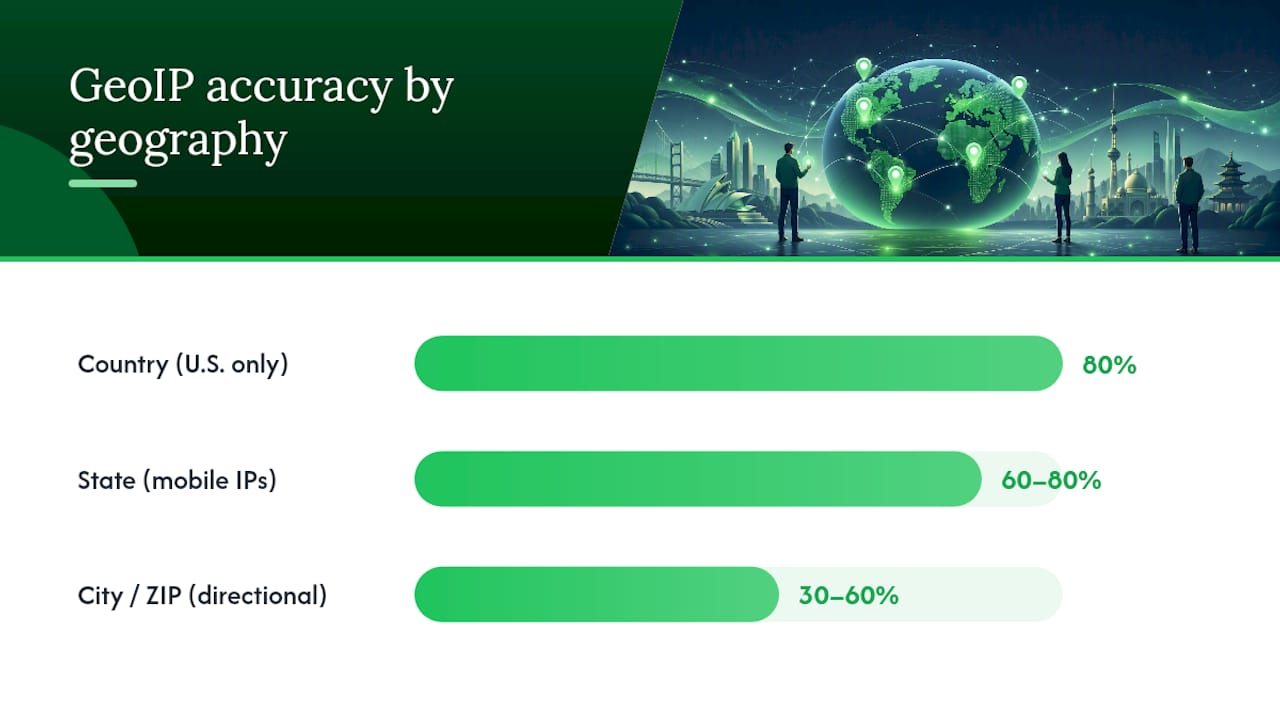
Ranges reflect typical practitioner experience with IP-based geolocation. Individual vendor lists and list age will shift results.
Look for broad patterns across 300 or more clicks rather than exact per-click precision. Geo-targeting can increase engagement, but accuracy worsens at smaller geographic scales, so use it selectively where your offer genuinely requires a specific region. Also worth noting: some subscribers are aware their location is being tracked and use privacy tools specifically to mask it, which adds another layer of noise to city and ZIP-level data.
How do you run a tracked test to verify a vendor's geo claims?
A buyer-controlled tracked test using your own tracking domain and a minimum of 300–500 unique clicks is the only reliable way to verify country-level geo delivery. For state-level patterns, plan for 1,000 or more clicks before drawing conclusions.
Setup steps:
- Create a tracking link in ClickMagick, RedTrack, or Voluum. Use your own domain as the redirect so the vendor cannot manipulate the destination after the link is shared.
- Append UTM parameters and a sub-ID to the link (e.g.,
utm_source=vendorname&utm_medium=solo&subid=test01). This lets GA4 separate this traffic from other sources. - Point the link to your own squeeze page, not the vendor's. You need behavioral data (time on page, opt-in rate, scroll depth) that only your own page can provide.
- Enable bot filtering and anti-abuse measures in your tracker. ClickMagick's built-in bot filtering and tools like Cloudflare Turnstile or hCaptcha on your form will flag non-human traffic before it inflates your geo count.
- Share only the tracking link with the vendor. Never give them direct access to your squeeze page URL.
What to inspect in your reports:
- Unique click count vs. raw click count (a high raw-to-unique ratio signals click inflation)
- Geo split by country, then state if you requested state-level targeting
- IP list or aggregated GeoIP output (run a sample through MaxMind GeoIP or IPinfo to cross-check)
- Device mix and time-of-day distribution (a legitimate U.S. list shows varied device types and clicks spread across U.S. business hours)
- Opt-in rate and bounce signals on your landing page via GA4
IPs, that is a geo miss. Request a make-good before placing any further orders. For email segmentation by region, the same verification logic applies: broad patterns matter more than individual click precision.
Pro Tip: Triangulate three data sources: your tracker's geo split, GA4's audience location report, and a manual IP lookup on 20–30 sample IPs using IPinfo. If all three point to the same country distribution, you have a confident read. If they diverge, the vendor's list metadata is likely stale or the traffic is partially proxied.
Vendor vetting checklist for geo-targeting claims
Before you order, paste these questions into your DM or email. Buyers should request specifics on how location is verified and whether replacements are available for off-target traffic.
- "Will you allow my ClickMagick/RedTrack/Voluum tracking link as the destination?" (Required. No = walk away.)
- "What percentage of Tier 1 (U.S.) clicks do you commit to in writing?" (Required. Verbal promises don't count.)
- "How do you verify subscriber location? Do you use opt-in metadata, IP geolocation, or both?" (Required. Vague answers signal weak segmentation.)
- "Can you provide a post-campaign report with total clicks, unique clicks, geo split, device split, and timestamps?" (Required.)
- "Can you provide a sample IP list or raw click log from a recent comparable campaign?" (Negotiable, but a strong positive signal if offered.)
- "What is your make-good or refund policy if geo delivery falls below the committed percentage?" (Required. Must be tied to a measurable threshold, not "we'll do our best.")
- "Do you allow me to use my own tracking domain?" (Required for reliable data.)
- "What is the typical delivery window for this list size and geo?" (Negotiable, but needed for planning.)
- "How old is the U.S. segment of your list? When were these subscribers last mailed?" (Negotiable, but list freshness directly affects geo accuracy.)
- "Have you run campaigns for similar offers in this niche? Can you share opt-in benchmarks?" (Negotiable, but useful for setting realistic expectations.)
A vendor who answers the "required" questions clearly and without hesitation is worth testing. One who deflects, offers screenshots instead of data, or refuses your tracking link is not.
Pro Tip: Cross-reference vendor answers against solo ad performance benchmarks before you decide. If a vendor's claimed opt-in rates are far above typical ranges for your niche, that is a red flag, not a selling point.
Red flags that should make you walk away
Some vendor behaviors signal fraud or unverifiable geo claims before you spend a dollar.
- Refusal to use your tracking link. This is the single clearest red flag in the industry.
- Vague or undated screenshots offered as proof of geo delivery. Screenshots without timestamps and raw IP data are unverifiable.
- "Guaranteed buyer traffic" claims. No vendor can guarantee purchase intent from an email list.
- Prices well below the typical Tier 1 floor. Unusually cheap U.S.-only clicks almost always mean the geo commitment is not real.
- No written make-good policy. A vendor who won't put replacement terms in writing before the campaign has no incentive to deliver.
- Inconsistent geo splits between what was promised and what the post-campaign report shows, with no explanation.
"buyers," or "premium verified U.S. traffic" in sales copy without any supporting data. These are marketing claims, not verifiable commitments.
If you detect a red flag mid-campaign: pause the order if possible, screenshot your tracker immediately, document the discrepancy with timestamps, and contact the vendor in writing to request a make-good tied to the measurable shortfall.
What do U.S. geo-targeted solo ads typically cost and when do they deliver?
Pricing for geo-targeted solo ads follows a predictable shape. Baseline (mixed international) clicks run cheaper than Tier 1 U.S.-only clicks, which carry a premium because the list segment is smaller and in higher demand. Narrowing further to a specific state adds another layer of cost and delivery difficulty, and city or ZIP-level requests are rarely fulfilled reliably at any price.
Typical delivery windows for a U.S.-only run of 300–500 clicks range from 3 to 7 business days, depending on list size and how frequently the vendor mails. Vendors who promise delivery in 24 hours for a large geo-targeted order are often pulling from a broader list and applying a post-click filter, which reduces geo accuracy. Slower pacing generally produces cleaner geo data because the vendor has time to segment properly.
IPs per my tracker, you owe me replacement clicks." Subjective promises like "high-quality traffic" are unenforceable. Understanding how geo targeting affects cost per lead helps you set a realistic budget before you negotiate.
Copyable email template to request a geo-targeted test
Use this template as a starting point. Edit the bracketed placeholders before sending.
Subject: Geo-Targeted Solo Ad Test Request — [Your Niche] / [Click Volume]
Hi [Vendor Name],
I'm interested in running a test order of [300–500] clicks, U.S.-only (Tier 1). Here are my requirements:
1. I will supply my own tracking link (ClickMagick/RedTrack). Please confirm you will use it as the destination. 2. I need a written commitment of [X]% U.S. clicks, verified by my tracker. 3. Delivery window: [5–7 business days] preferred. 4. Post-campaign report required: total clicks, unique clicks, geo split, device split, timestamps. 5. Make-good terms: if U.S. delivery falls below [80]% of unique clicks per my tracker, I request replacement clicks at no charge.
Please confirm these terms before I send payment. I'm happy to share a screenshot of my tracking setup in advance.
[Your Name]
Customization notes:
- For different niches: Add one sentence describing your offer type (e.g., "This is a make-money-online lead magnet") so the vendor can confirm list relevance.
- For faster pacing: Reduce the click volume to 200–300 and shorten the delivery window to 3–5 days. Smaller orders are easier to fulfill with accurate geo segmentation.
- For state-level targeting: Increase the minimum click volume to 1,000 and adjust the make-good threshold to 60% for the target state, since state-level accuracy is lower by nature.
Pro Tip: Before sending payment, ask the vendor for a screenshot of their list dashboard showing the U.S. segment size. A vendor with a genuine U.S. segment will share this without hesitation. One who can't or won't is likely pulling from a mixed list and filtering after the fact.
What 11 years of testing geo claims actually taught me
Most geo-targeting failures in solo ads are not outright fraud. They are the result of vendors overselling the precision of their list metadata. But list decay, subscriber VPN use, and mobile carrier IP drift mean the real number at the time of your campaign could be significantly lower.
The campaigns that passed a geo test shared one trait: the vendor provided raw click logs with IPs before being asked, not after a complaint. That willingness to be transparent upfront is the strongest positive signal I've seen across hundreds of test runs.
The campaigns that failed shared a different pattern: the vendor offered a geo split screenshot with no timestamps and no IP data. When I ran the IPs from my own tracker through IPinfo, the country distribution rarely matched what the screenshot showed.
Preserve every piece of evidence: screenshots of your tracker dashboard, timestamped click logs, and the vendor's written commitments. When you request a make-good, that documentation is what turns a vague promise into an enforceable conversation.
Sources
These are the tools referenced throughout this guide, organized by the step where you'll use them.
- Solo Ads Tested: The Truth About Email Blast Traffic In 2025 | ConvertMinded
- Geo‑Targeting: Sending Location‑Based Email Campaigns - Influenctor
- Are Solo Ads Worth It for Affiliate Marketers in 2026? Costs, Risks and Realistic Returns - Market Spur
For a niche targeting strategy that goes beyond solo ads, the geo and audience segmentation principles translate well across channels.
Start with Soloadsguide's full 21-question vetting framework and the step-by-step tracking guides at Soloadsguide before placing your first geo-targeted order.
Recommended
- What Is a Targeted Email Audience? Solo Ad Buyer's Guide
- The Solo Ads Guide for Affiliate Marketers
- How to Avoid Solo Ad Scams: 2026 Buyer's Guide
- How to Track Solo Ad Traffic (Catch Low-Quality Clicks)
Want Verified Traffic Without the Guesswork?
PulseTraffic screens every seller, filters bot clicks in real time, and shows you verified buyer traffic labels before you spend a dollar.
